"Programs get smart when they can choose. 'If this, do that' is how your code reacts to the world."
Learning Objectives
By the end of this module, you will be able to:
- Write
if/else if/elsestatements - Use comparison and logical operators
- Choose between
if,switch, and the ternary shortcut
1. If / Else
Conditions run code only when something is true.
[object Object], (score >= ,[object Object],) {
  grade = ,[object Object],;
} ,[object Object], ,[object Object], (score >= ,[object Object],) {
  grade = ,[object Object],;
} ,[object Object], {
  grade = ,[object Object],;
}Key idea: JavaScript checks each condition top to bottom and runs the first one that's true, then skips the rest. Order your conditions from most specific to most general.
Read the example like a story: "If the score is 90 or above, the grade is A. Otherwise, if it's 80 or above, it's B. Otherwise, keep practicing." The else if chain lets you handle as many cases as you need, and the final else is the catch-all for everything that didn't match. Only one branch ever runs.
Explain like I'm new: An if/else is a fork in a road. The condition is the signpost; your program walks down exactly one path based on what's true right now. else if just adds more forks along the way.
2. Comparison Operators
| Operator | Means |
|---|---|
=== | Equal (value and type) |
!== | Not equal |
> < | Greater / less than |
>= <= | Greater/less than or equal |
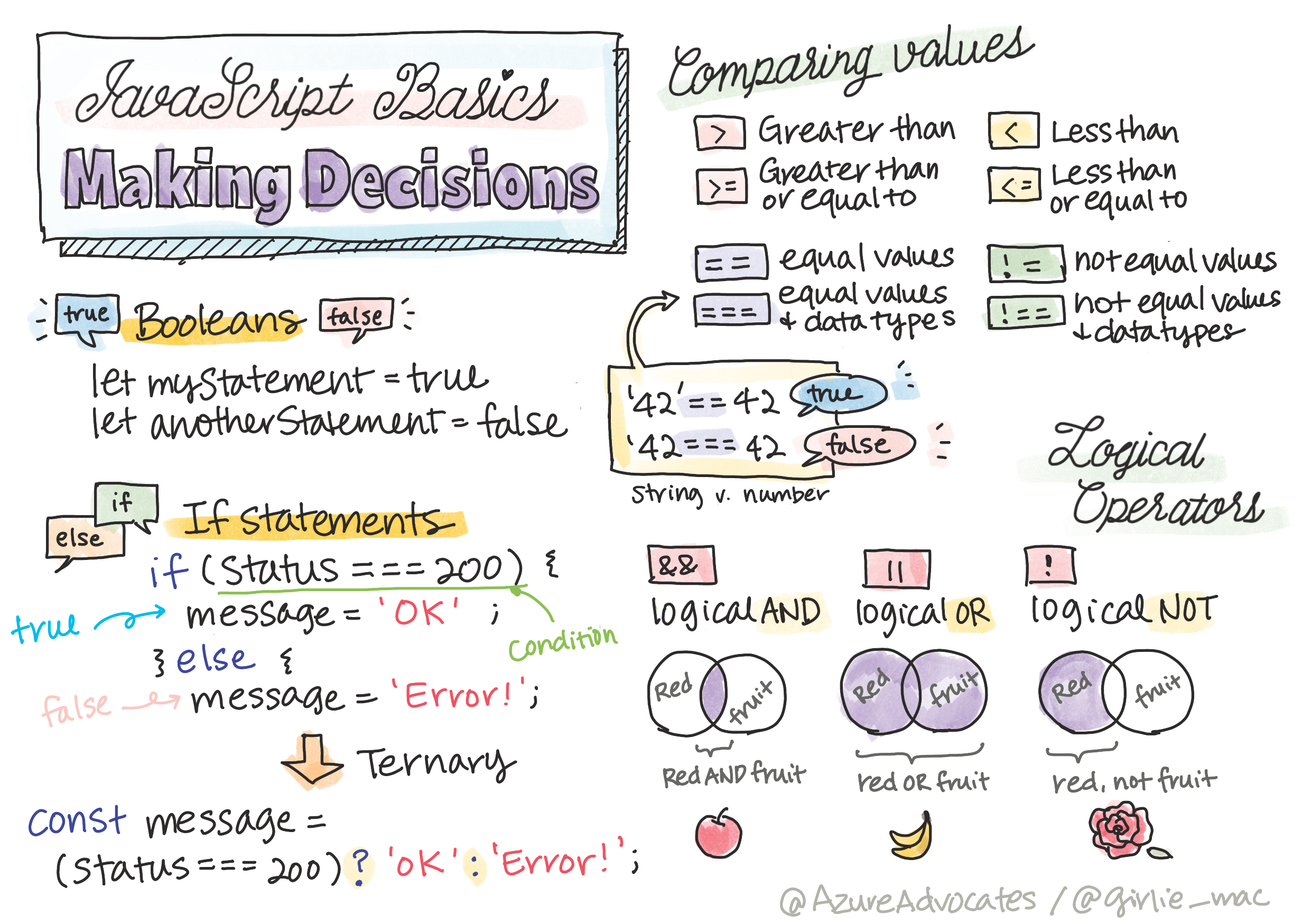
Every condition boils down to true or false. JavaScript also treats some values as "truthy" or "falsy" on their own: 0, "" (empty string), null, and undefined all count as false, while most other values count as true. That's handy — if (name) quietly checks "is name filled in?" — but it's also the source of the == surprises below.
Beginner mistake: Using == instead of ===. Loose == does surprising type conversions (0 == "" is true!). Stick with === and !== to compare safely and predictably.
3. Logical Operators
Combine conditions with:
&&(AND) — both must be true||(OR) — at least one true!(NOT) — flips true/false
[object Object], (age >= ,[object Object], && age <= ,[object Object],) { ,[object Object],.,[object Object],(,[object Object],); }Read these out loud and they make sense: age >= 13 && age <= 19 is "age is at least 13 and at most 19." Swap in || and it becomes "either one." The ! flips a value — !isOpen means "not open." Combining a few of these lets you express surprisingly precise rules.
Common mistake: Chaining comparisons like 13 <= age <= 19. That looks mathematical but doesn't work in JavaScript — you must write age >= 13 && age <= 19 with an explicit && between two full comparisons.
Real-world use case: Login logic is one big decision: if the password matches && the account isn't locked → let them in; else → show an error. Every form validation, game rule, and access check you'll ever write is built from these same conditions.
4. Switch & Ternary
For many fixed options, switch is tidy. For a quick two-way choice, the ternary is a one-liner:
[object Object], message = isLoggedIn ? ,[object Object], : ,[object Object],;The ternary reads as a question: condition ? value if true : value if false. It's perfect for picking between two small values inline, like a label or a class name — but resist cramming complex logic into one; a plain if is clearer when there's a lot going on.
Here's a switch handling several fixed options at once:
[object Object], (day) {
  ,[object Object], ,[object Object],:
  ,[object Object], ,[object Object],:
    ,[object Object],.,[object Object],(,[object Object],);
    ,[object Object],;
  ,[object Object],:
    ,[object Object],.,[object Object],(,[object Object],);
}Each case checks one value; break stops it falling through to the next; default catches anything unmatched. Use switch when you're comparing one variable against many possible values — it's tidier than a long if/else if chain there.
Practice task: Write an if/else if/else that turns a number score (0–100) into a letter grade. Test it with 95, 72, and 40 to make sure each branch works.
Key Takeaway: Decisions use if / else if / else, checking conditions top-to-bottom and running the first true one. Compare with ===/!== (never loose ==), combine with &&, ||, !, and reach for switch (many options) or the ternary (quick two-way choice) when they read more clearly.
Further Learning
Adapted from Microsoft's Web Dev for Beginners (MIT License). Sketchnote by Tomomi Imura.