"A function is a reusable recipe. Write the steps once, then run them whenever you like — with different ingredients each time."
Learning Objectives
By the end of this module, you will be able to:
- Write and call a function
- Pass in parameters and return a result
- Use arrow functions
- Understand what a "method" is
1. Why Functions?
Functions let you name a block of code and reuse it, so you don't repeat yourself.
[object Object], ,[object Object],(,[object Object],) {
  ,[object Object], ,[object Object], + name + ,[object Object],;
}

,[object Object],(,[object Object],);    ,[object Object],
,[object Object],(,[object Object],);   ,[object Object],
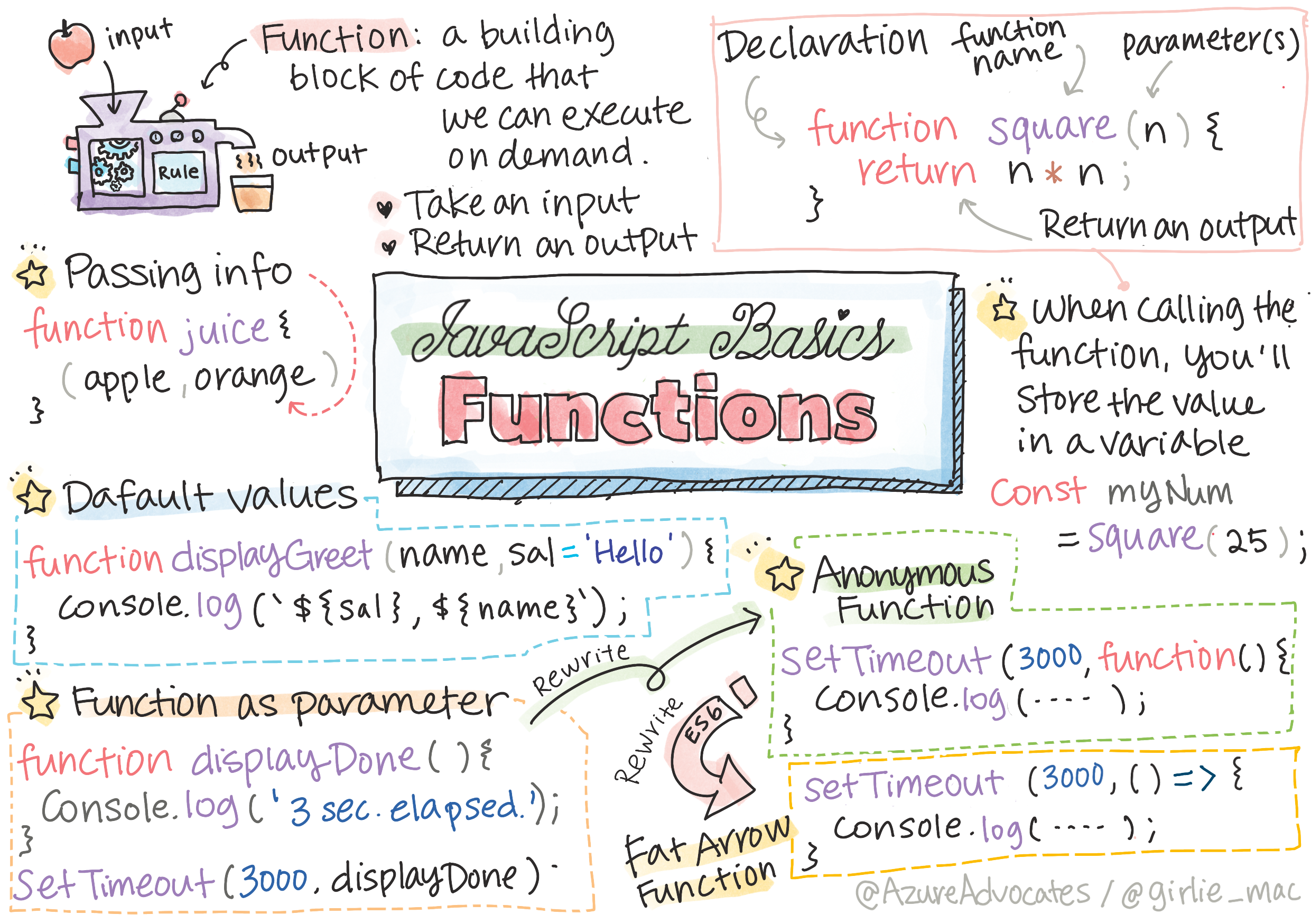
Key idea: A function takes inputs (parameters), does something, and usually returns a result. Think of it as a machine: put ingredients in, get an output back.
The real win is DRY — "Don't Repeat Yourself." Imagine you greet users in ten places on your site. Without a function, that's ten copies of the greeting logic; if you want to change the wording, you edit all ten. With a function, you change it once inside greet, and every call updates automatically. Less code, fewer bugs, easier changes.
Explain like I'm new: A function is a recipe card. You write the steps once — "how to make a greeting" — then follow the card any time you need one, with different names each time. You don't reinvent the recipe on every use.
2. Parameters & Return
- Parameters are the inputs, listed in the parentheses.
returnhands a value back to whoever called the function.
A function without return still does something (like printing), it just doesn't give a value back.
Here's the difference in code:
[object Object], ,[object Object],(,[object Object],) {
  ,[object Object], a + b;      ,[object Object],
}
,[object Object], sum = ,[object Object],(,[object Object],, ,[object Object],);   ,[object Object],
,[object Object],.,[object Object],(sum);         ,[object Object],
Here a and b are the parameters (the placeholders); 2 and 3 are the arguments (the real values you pass in). The return sends 5 back so you can store it in sum and use it later.
Concept: A function that returns a value is like a vending machine — you put money in and get a snack out. A function without return is more like a doorbell — it does something (rings), but hands nothing back to you.
3. Arrow Functions
Modern JavaScript has a shorter way to write functions — arrow functions:
[object Object], ,[object Object], = (,[object Object],) => ,[object Object], + name + ,[object Object],;You'll see these everywhere, especially with events and array methods.
It's the same function as before, just shorter. When the body is a single expression, an arrow function even lets you skip the return — the result is handed back automatically. Compare:
[object Object], ,[object Object],(,[object Object],) { ,[object Object], n * ,[object Object],; }   ,[object Object],
,[object Object], ,[object Object], = (,[object Object],) => n * ,[object Object],;           ,[object Object],
Both do exactly the same thing. Arrow functions shine in short, one-line helpers you pass to other functions.
Try this: Rewrite the classic greet function from the top of this module as an arrow function. If the output is identical, you've understood the shorthand.
4. Methods
A method is just a function that belongs to something. You've used them already:
[object Object],.,[object Object],();     ,[object Object],
[,[object Object],, ,[object Object],, ,[object Object],].,[object Object],(,[object Object],);         ,[object Object],
,[object Object],.,[object Object],(,[object Object],);         ,[object Object],
The dot is the giveaway: value.method() means "run this method that belongs to this value." Strings, arrays, numbers, and objects each come with their own toolbox of built-in methods, so you rarely have to build common operations from scratch — you just look up the right one.
Real-world use case: Nearly everything you'll do with data uses methods: .toUpperCase() to shout a string, .map() to transform a list, .addEventListener() to react to a click. Learning to reach for the right method is a huge part of becoming fluent in JavaScript.
Beginner mistake: Forgetting the parentheses when calling a function. greet refers to the function itself; greet() actually runs it. Missing () is a very common "why is nothing happening?" bug.
Practice task: Write a function area(width, height) that returns width * height, then call it with a few values and log the results. You've just built a reusable tool.
Key Takeaway: Functions name and reuse code: they take parameters, do work, and often return a value. Arrow functions are a shorter syntax you'll see constantly, and methods are functions attached to values (like .toUpperCase()). Always call with () — or nothing happens.
Further Learning
Adapted from Microsoft's Web Dev for Beginners (MIT License). Sketchnote by Tomomi Imura.