
"Before JavaScript can do anything clever, it needs somewhere to keep information. That's what variables and data types are for."
Learning Objectives
By the end of this module, you will be able to:
- Create variables with
letandconst - Recognize JavaScript's basic data types
- Understand strings, numbers, and booleans
- Avoid a classic type-related bug
1. Variables: Named Containers
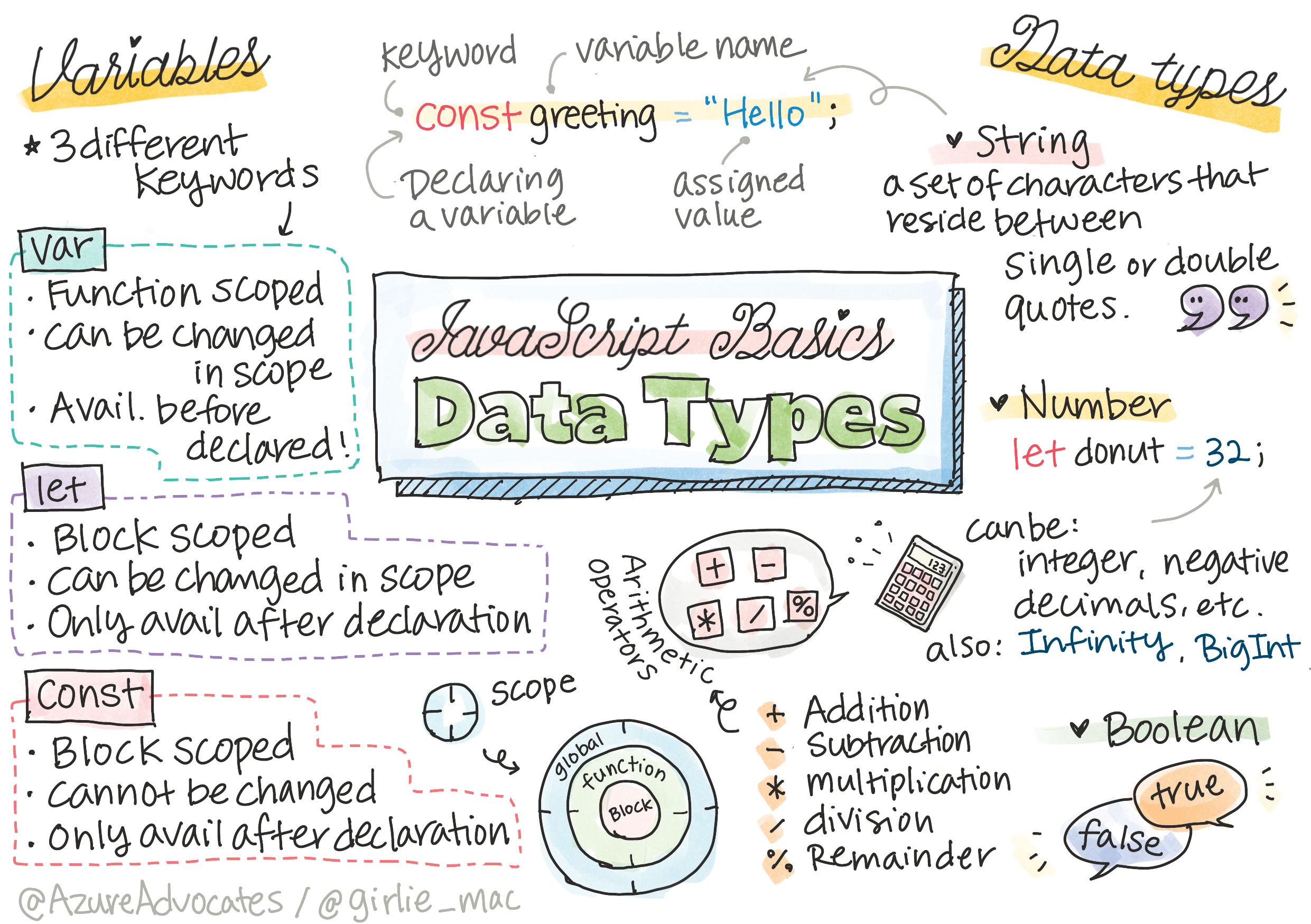
A variable stores a value under a name so you can use it later.
[object Object], score = ,[object Object],;         ,[object Object],
,[object Object], name = ,[object Object],;    ,[object Object],
score = score + ,[object Object],;    ,[object Object],
Key idea: Use const by default and only reach for let when the value truly needs to change. It signals your intent and prevents accidental reassignment.
When you write let score = 0, three things happen: you declare a variable named score, you assign it the value 0, and JavaScript reserves a spot in memory to hold it. Later, score = 10 changes what's in that spot. With const, that second step is locked — try to reassign a const and JavaScript stops you with an error, which is exactly the safety net you want for values that shouldn't change.
Explain like I'm new: A variable is like a labeled jar. The label (score) never changes, but with let you can swap what's inside the jar whenever you like. With const, you glue the lid shut — the contents stay put.
Common mistake: Trying to use a variable before you declare it, or reusing the same name in one scope. Give each variable a clear, descriptive name (userScore, not x) — readable names prevent more bugs than any tool.
2. The Basic Data Types
| Type | Example | Used for |
|---|---|---|
| String | "hello" | Text |
| Number | 42, 3.14 | Any number |
| Boolean | true / false | Yes/no, on/off |
| null | null | "Deliberately empty" |
| undefined | undefined | "No value yet" |
| Array | [1, 2, 3] | An ordered list |
| Object | { name: "Sam" } | Named values |
A useful split: the first five (string, number, boolean, null, undefined) are primitive types — single, simple values. Arrays and objects are collections that hold many values, and you'll use them constantly to model real things: an array for a list of scores, an object for one user's details.
[object Object], user = { ,[object Object],: ,[object Object],, ,[object Object],: ,[object Object],, ,[object Object],: ,[object Object], };That one object bundles a string, a number, and a boolean under clear names — a tiny data record.
Concept: You don't need to master arrays and objects yet — they get their own modules later. For now, just recognize them: square brackets [ ] mean an ordered list, and curly braces { } mean a set of named values.
3. Working with Strings & Numbers
Strings can be joined ("concatenated") or built with template literals (backticks):
[object Object], name = ,[object Object],;
,[object Object], greeting = ,[object Object],;   ,[object Object],
Numbers do math directly (+, -, *, /). Watch out: a number from a form arrives as a string, so convert it first with Number(value). For example, Number("25") gives the number 25, ready for math.
Template literals are the modern favorite because they read cleanly: instead of gluing pieces with +, you drop variables straight into the text with ${...}. They can even span multiple lines, which older string-joining couldn't do gracefully.
Beginner mistake: Adding a string and a number. "5" + 3 gives "53" (text joined), not 8. If a value came from an input box, convert it with Number(...) before doing math.
Try this: Type typeof "hello" and typeof 42 in the console. The typeof operator tells you a value's type — a quick way to check what you're actually holding. Once you know a value's type, most "weird" JavaScript behavior suddenly makes sense.
Practice task: In the console, make a const for your name and a let for your age, then log a template-literal sentence like `Hi, I'm ${name} and I'm ${age}.`. Change the age and log again.
Key Takeaway: Variables store values — use const by default, let when it changes. JavaScript's core types are strings, numbers, booleans, null, undefined, arrays, and objects. Build text with template literals, and convert form values with Number() before math to avoid the "5" + 3 = "53" trap.
Further Learning
Adapted from Microsoft's Web Dev for Beginners (MIT License). Sketchnote by Tomomi Imura.