"Git is a time machine for your code. GitHub is where you share that time machine with the world — and with your future self."
Learning Objectives
By the end of this module, you will be able to:
- Explain what version control is and why it matters
- Understand the core Git actions in plain words
- Say what GitHub adds on top of Git
- Know the beginner workflow
1. What Is Version Control?
Version control keeps a history of every change you make to your code, so you can undo mistakes, see what changed, and work with others without overwriting each other. Git is the tool that does this.
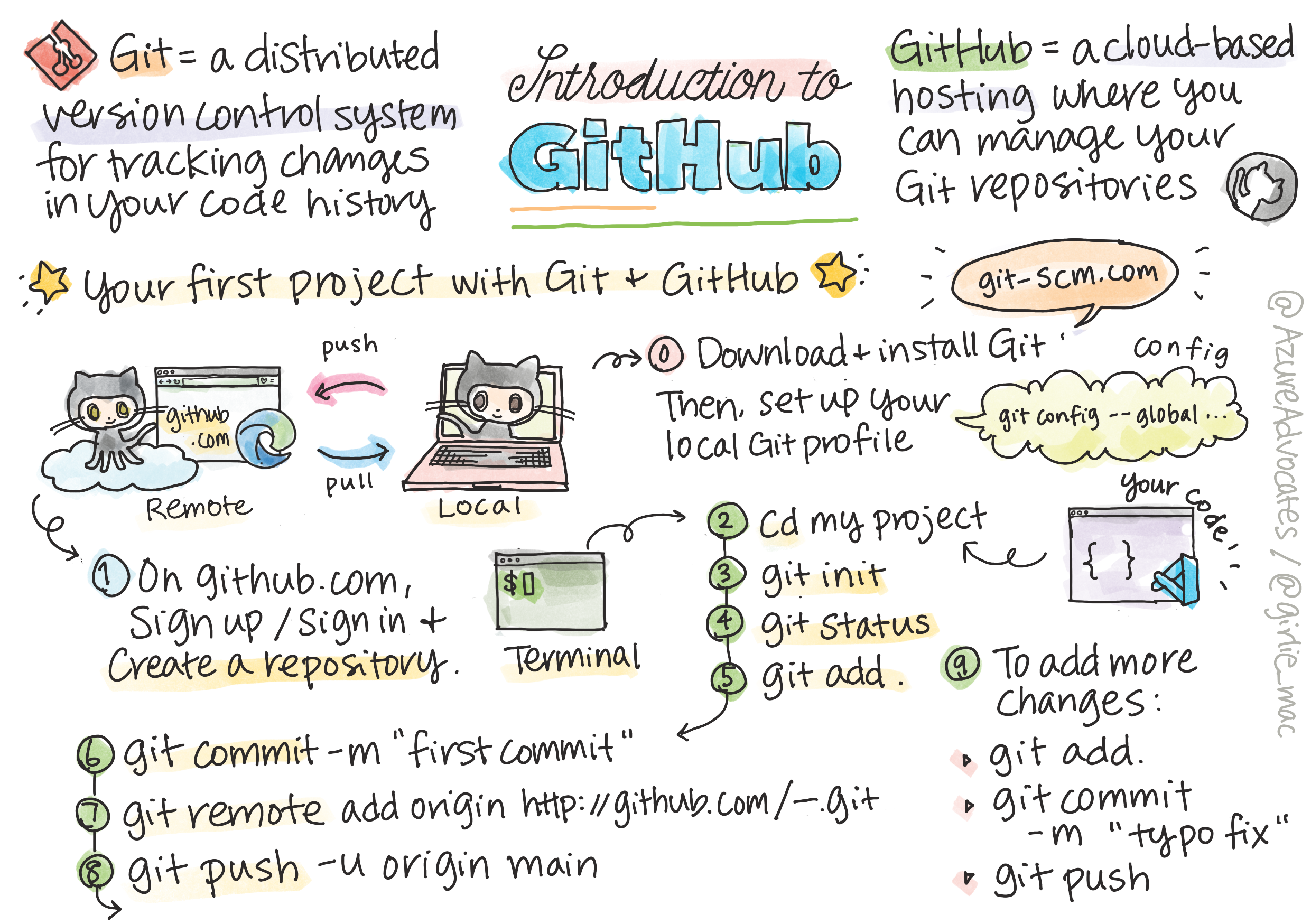
Key idea: Git lets you save "checkpoints" (called commits) of your project. If something breaks, you can look back — or roll back — to any checkpoint. It's the closest thing coding has to an undo button that never forgets.
Imagine writing an essay and saving copies named essay-final, essay-final-2, essay-REALLY-final. That's version control done painfully by hand. Git does it properly: one project folder, with a complete, labeled history you can scroll through, compare, and restore from — without a mess of duplicate files. Every serious software project in the world, from tiny personal sites to the huge apps on your phone, is tracked this way, almost always with Git.
Explain like I'm new: If you've ever used the "version history" in Google Docs, you already understand Git's core promise. It records snapshots over time so you can see who changed what and when, and roll back if needed. Git just gives you far more control over when each snapshot is taken.
2. The Core Git Actions
You'll use just a handful of commands 90% of the time:
| Action | Plain meaning |
|---|---|
| clone | Copy a project to your computer |
| add | Choose which changes to save |
| commit | Save a checkpoint with a message |
| push | Upload your commits to GitHub |
| pull | Download others' latest changes |
In practice, these chain together into a simple daily rhythm:
git add .                      ,[object Object],
git commit -m ,[object Object],   ,[object Object],
git push                       ,[object Object],
You edit some files, add the ones you want to keep, commit them with a short message describing what you did, and push to share. The next day, pull brings down anything teammates changed. That's genuinely 90% of everyday Git.
Common mistake: Confusing add and commit. add only stages changes (marks them ready); commit is what actually saves the checkpoint. Many beginners add their files and wonder why nothing was saved — the commit step is what makes it permanent in your history.
3. What GitHub Adds
Git runs on your computer; GitHub is a website that stores your Git projects online. It adds:
- Backup — your code lives safely in the cloud
- Sharing — show your work with a link
- Collaboration — teams work on the same project
- Portfolio — employers often look at your GitHub
A helpful way to hold the difference: Git is the tool, GitHub is the place. You could use Git entirely on your own computer and never touch GitHub. But pushing to GitHub means your work is backed up off your machine, viewable by anyone you share the link with, and open for others to suggest changes through pull requests — the way teams review each other's code before it goes live.
Real-world use case: Your GitHub profile doubles as a living résumé. When you finish the projects in this course, pushing them to GitHub gives you public links you can put on a CV — proof you can actually build things, which employers value far more than a list of buzzwords.
Beginner tip: Write clear commit messages that finish the sentence "This commit will…" — like "Add contact form" or "Fix header spacing." Your future self will thank you when scrolling through history.
Try this: Create a free account at github.com, then make a new repository called hello-world. Even empty, you've just claimed your corner of the world's largest code-sharing platform — the same one used by millions of developers and nearly every major open-source project.
Key Takeaway: Version control (via Git) saves a full history of your code as checkpoints called commits, so you can undo, compare, and collaborate safely. The core actions are clone, add, commit, push, and pull. GitHub stores your Git projects online for backup, sharing, teamwork, and as a portfolio.
Further Learning
Adapted from Microsoft's Web Dev for Beginners (MIT License). Sketchnote by Tomomi Imura.