"Before you build for the web, it helps to know what actually happens when you type an address and hit Enter."
Learning Objectives
By the end of this module, you will be able to:
- Explain the client, server, and request/response cycle
- Describe what a URL is made of
- Understand HTTP in plain terms
- Know what files a web page is built from
1. The Request/Response Cycle
The web works like ordering at a restaurant. Your browser (the client) asks for something; a server (the kitchen) prepares it and sends it back.
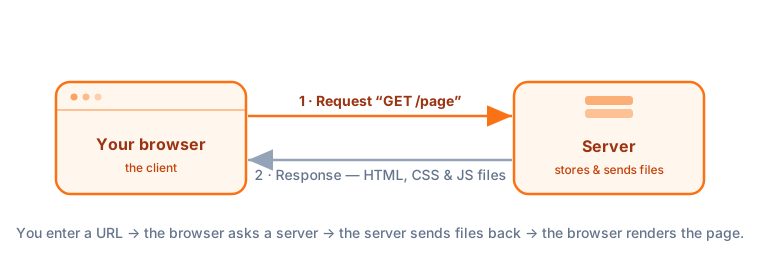
Key idea: Client and server are just roles. The client asks (that's your browser), the server answers (a computer somewhere that stores the website). Every page load is one round trip: request → response.
Let's slow that round trip down. When you type example.com and hit Enter, your browser first looks up the address (a step called DNS, like looking up a phone number for a name). It then opens a connection to that server and sends a request. The server reads the request, gathers the right files, and sends back a response. Your browser unpacks the response and paints the page — usually in well under a second.
Explain like I'm new: DNS is the web's phone book. You know the name of the place you want (google.com), but computers need the number (an IP address like 142.250.72.14). DNS quietly translates the name into the number before your request can even leave your device.
2. What's in a URL?
A URL is a web address, and it has parts:
https://example.com/learn/web?topic=html
- https:// — the protocol (how to talk;
httpsis the secure version) - example.com — the domain (which server)
- /learn/web — the path (which page)
- ?topic=html — optional query (extra info)
Put together, that address says: use a secure connection, go to the example.com server, find the /learn/web page, and pass along the extra note topic=html. Every link you click and every address you type breaks down this same way.
Concept: The part after a # (if present) is called the fragment — it jumps to a spot within a page rather than loading a new one. That's how a "Back to top" link or a documentation anchor works without a fresh server request.
3. HTTP in Plain Terms
HTTP is the language browsers and servers use to talk. The two you'll meet most:
| Method | Means | Example |
|---|---|---|
| GET | "Please send me this" | Loading a page |
| POST | "Here's some data to save" | Submitting a form |
Servers also send a status code — like 200 (OK), 404 (not found), or 500 (server error).
Status codes come in helpful ranges: 2xx means success, 3xx means "redirect — the thing moved," 4xx means "you (the client) made a mistake," and 5xx means "the server broke." You don't need to memorize the numbers; just knowing the family tells you where to look when something goes wrong.
Beginner mistake: Confusing 404 ("the page doesn't exist") with a code problem in your files. A 404 usually means the address or file path is wrong — not that your HTML is broken. Check the path first.
4. What a Web Page Is Made Of
When the server responds, it sends plain files your browser assembles into a page:
- HTML files — the content and structure
- CSS files — the styling
- JavaScript files — the interactivity
- Assets — images, fonts, videos
Your browser downloads these and renders them into the page you see.
The order matters a little: the browser reads the HTML first to learn the page's structure, then applies the CSS to style it, then runs the JavaScript to make it interactive. This is why a page sometimes appears for a split second unstyled before the CSS "kicks in" — you're watching the assembly happen in real time.
Real-world use case: When a site feels slow, developers open the browser's Network tab (Module 20) to see exactly which files were requested, how big each was, and how long it took to arrive. Every page you visit is just this list of files showing up one by one.
Try this: On any website, right-click and choose "View Page Source." You're looking at the raw HTML the server sent. Everything you'll learn to write in this course is exactly what powers the sites you use every day.
Key Takeaway: The web runs on a request/response cycle: your browser (client) requests a URL, a server responds with files. URLs have a protocol, domain, path, and optional query; HTTP methods like GET and POST carry the conversation, with status codes (200, 404, 500) reporting the result. A page is assembled from HTML, CSS, JavaScript, and assets.