"Every website you've ever loved is built from just three languages. In this course, you'll learn all three — by building real things."
Learning Objectives
By the end of this module, you will be able to:
- Explain what this course teaches and who it's for
- Know the fun projects you'll build
- See your step-by-step learning path
- Check the (very small) prerequisites
1. What You'll Learn
This course takes you from zero to building real, interactive web pages using the three languages every website is made of:
- HTML — the structure (headings, text, images, buttons)
- CSS — the style (colors, layout, fonts, spacing)
- JavaScript — the behavior (clicks, updates, logic)
Key idea: HTML is the nouns, CSS is the adjectives, and JavaScript is the verbs of a web page. Learn these three and you can build almost anything on the web.
Here's all three working together in just a few lines:
[object Object],My Plant,[object Object],                      ,[object Object],
,[object Object],[object Object],[object Object],  ,[object Object],
,[object Object],[object Object],[object Object],  ,[object Object],
Notice how each language has a clear job. HTML names the thing on the page, CSS decides what it looks like, and JavaScript makes it do something. You'll rarely use one without the others — they're a team, and this course teaches you to coordinate all three so they work as one.
Explain like I'm new: Think of building a house. HTML is the frame and walls, CSS is the paint and furniture, and JavaScript is the electricity that makes lights switch on and doors open. A house needs all three before it feels finished.
2. Who It's For
Complete beginners. No coding experience, no math background, and no jargon assumed. If you can use a web browser and are curious how websites are made, you're ready. You'll move at your own pace, and every new term is explained the moment it first appears. If you've ever wondered whether coding is "for you," treat this course as the low-pressure way to find out — the vast majority of professional developers started from exactly where you are right now.
3. What You'll Build
You learn best by making things, so this course is built around fun, hands-on projects (adapted from Microsoft's Web Dev for Beginners):
- 🌱 A drag-and-drop terrarium — HTML, CSS, and the DOM
- ⌨️ A typing game — keyboard events
- 🚀 A space game — the canvas and a game loop
- 🏦 A simple banking app — forms, fetching data, and state
Each project is chosen to teach one specific skill in a way you can actually see: the terrarium shows how JavaScript grabs and moves elements on a page; the typing game reacts to your keyboard in real time; the space game draws and animates graphics frame by frame; and the banking app ties everything together with data, forms, and multiple screens. By the end you won't just know the languages — you'll have four finished projects you can show off in a portfolio.
4. Your Learning Path
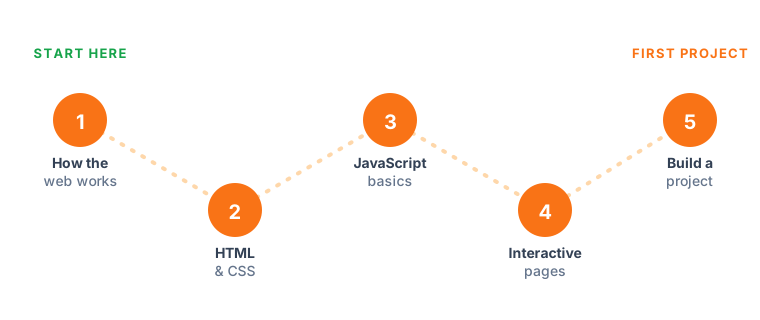
The course is 15 short modules, grouped into a natural path: fundamentals → HTML → CSS → JavaScript → interactivity → APIs → debugging → accessibility → projects, finishing with a quiz, a glossary, and a roadmap for what's next. Each module has a scannable summary, a visual, and quick callouts — no walls of text. The order matters: each module builds on the one before, so by the time you meet JavaScript you'll already be comfortable with the HTML and CSS it controls. Feel free to revisit earlier modules any time — gentle repetition is exactly how this material sticks.
5. Prerequisites
Almost nothing! You need a computer, a modern browser (Chrome, Edge, Firefox, or Safari), and curiosity. In Module 3 we'll set up a free code editor. That's it.
Beginner tip: You don't have to install anything to begin. You can write HTML, CSS, and JavaScript right in a free online playground (like CodePen or the browser's own tools) and see results instantly. Start playing today.
Try this: Open a new tab, go to CodePen.io, and type <h1>Hello!</h1> into the HTML box. You just wrote your first web page — no installation, no setup. That instant feedback loop, where a tiny change shows up on screen immediately, is what makes web development so fun to learn.
Key Takeaway: This beginner course teaches the three core web languages — HTML (structure), CSS (style), and JavaScript (behavior) — through fun projects like a terrarium, typing game, space game, and banking app. It's built for total beginners, needs only a browser and curiosity, and follows a clear 15-module path.
Further Learning
- Getting started with the web — MDN
- Learn web development — web.dev
- Web Development for Beginners — Microsoft
Adapted from Microsoft's Web Dev for Beginners (MIT License).