"One tool is handy. Tools that hand off to each other — and fail gracefully — are what make an agent feel genuinely capable."
Level: Intermediate · Time: ~3 days · Prerequisites: Module 11
Learning Objectives
By the end of this module, you will be able to:
- Understand how the model chains multiple tools in one turn
- Handle tool errors so the app never crashes
- Keep tool conversations coherent with session memory
- Choose between tools and RAG for a given problem
1. Tool Chaining
The real power shows when one question needs several tools in sequence. Ask "What's the weather in Seattle in Fahrenheit?" and the agent:
- calls
getCurrentWeather("Seattle")→ gets 22°C, then - passes that into
celsiusToFahrenheit(22)→ gets 71.6°F, then - composes one natural answer.
All in a single conversation turn, orchestrated by the model — you didn't script the order.
This matters because you can't anticipate every combination a user will ask for. With three tools — weather, unit conversion, and a clothing recommender — the model can answer "what should I wear in Seattle?" by chaining all three, or answer a simpler question with just one. You add capabilities; the model composes them on demand.
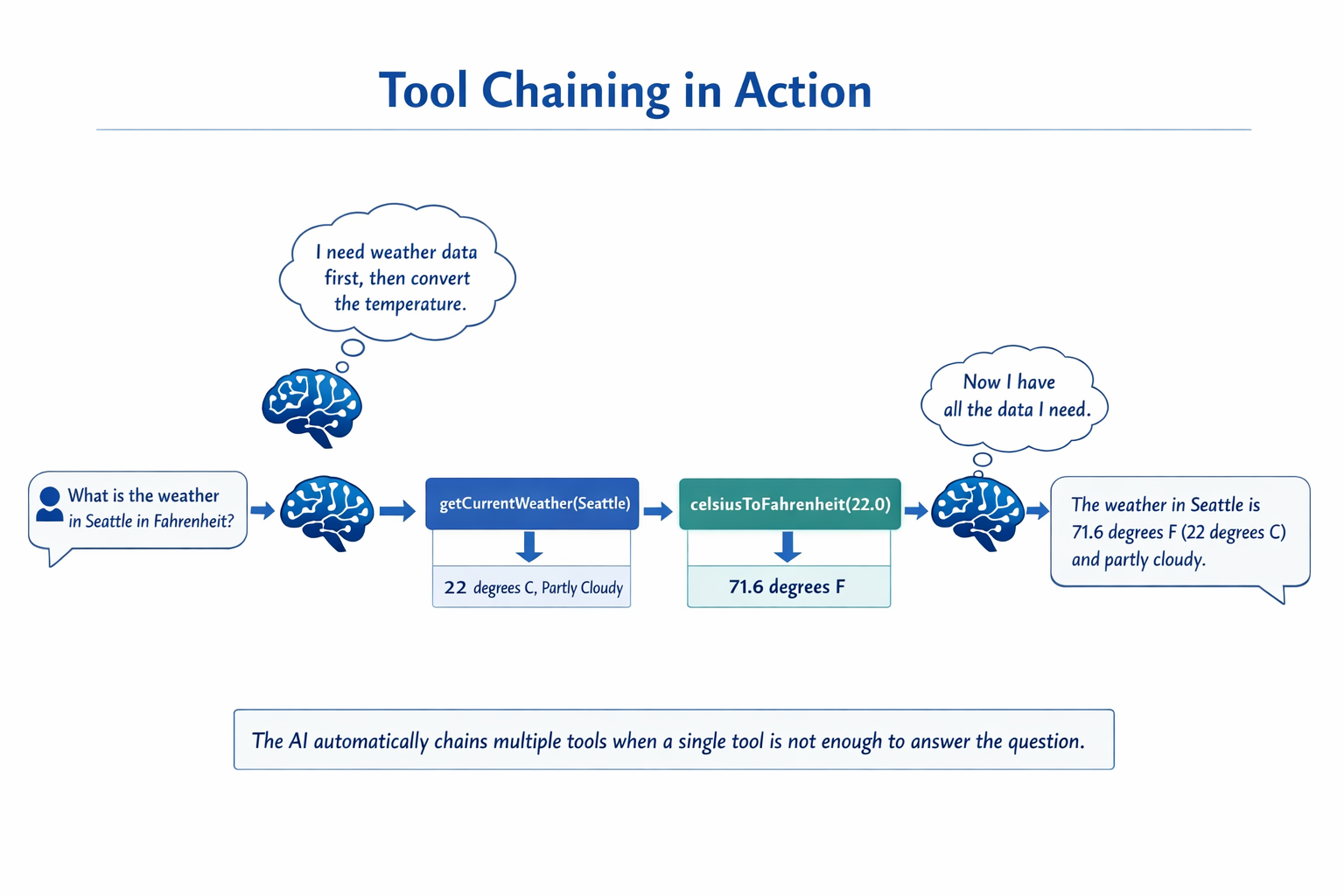
Concept: You never wrote "first call weather, then convert." The model reasoned that the second tool needs the first tool's output and chained them. That autonomy is what makes it an agent, not a script.
2. Failing Gracefully
Tools touch the real world, and the real world breaks — APIs time out, cities aren't found. A well-built tool returns an error message instead of throwing, so the agent can explain the problem rather than crash.
[object Object],
,[object Object], String ,[object Object],[object Object], {
    ,[object Object], (!known(location)) {
        ,[object Object], ,[object Object], + location + ,[object Object],;
    }
    ,[object Object], lookup(location);
}The model reads that message and tells the user politely, "I don't have weather data for that city." The app stays up.
The principle generalizes: any tool that touches a network, a database, or a file should catch its own failures and hand back a short explanation. Think of the return string as a message to the model, not just a value — a clear "rate limit hit, try again in a minute" lets the model respond sensibly instead of failing silently.
Common mistake: Letting a tool throw an unhandled exception. That can crash the request. Return a clear, human-readable error string and let the model relay it.
3. Sessions Keep Tools Coherent
Tool-using agents still need memory (Module 5). With a conversation ID, the agent remembers earlier turns — so "and in Fahrenheit?" after a weather question just works, because it recalls which city you meant.
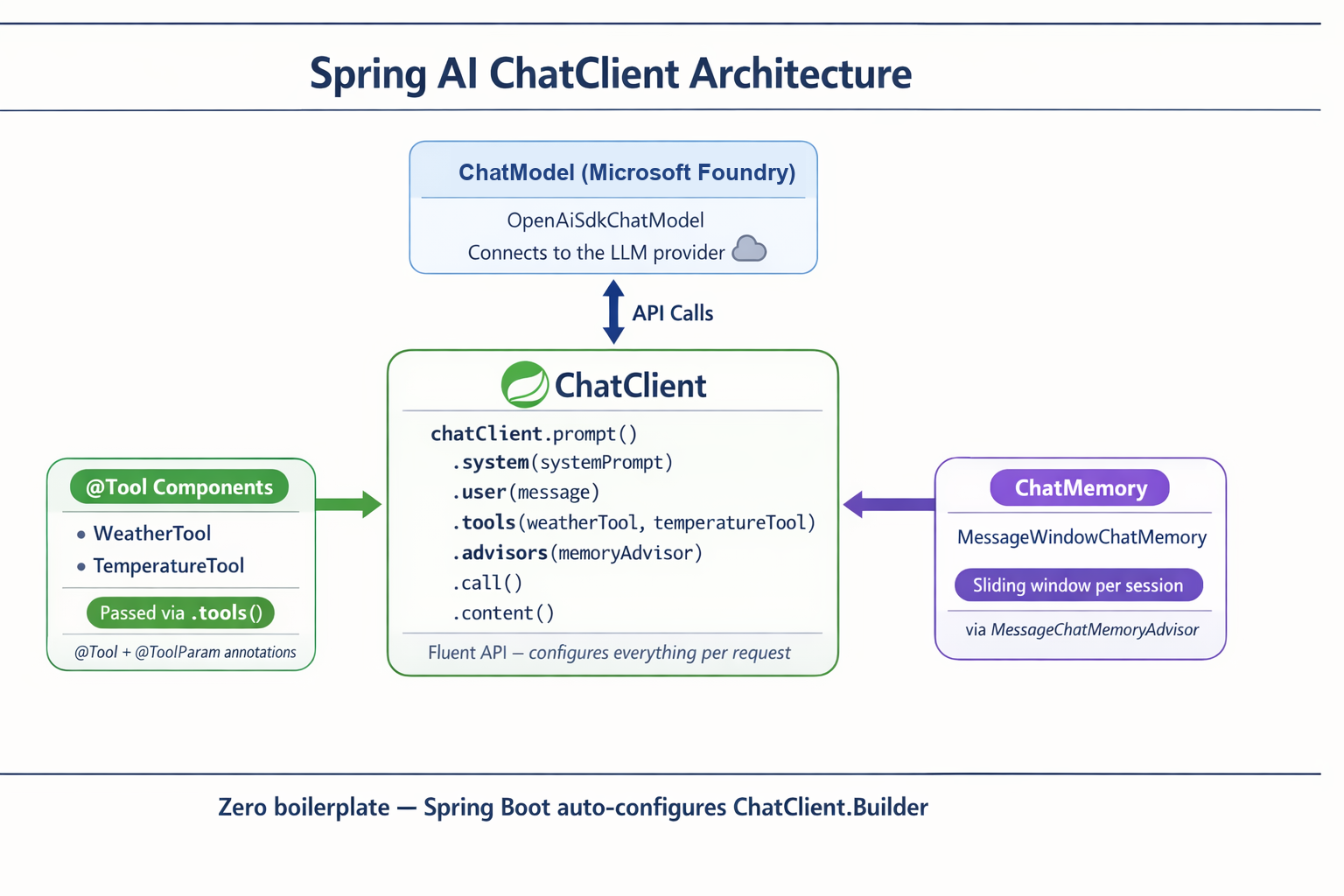
Spring Boot auto-wires the ChatClient with your model, memory, and tools — you get multi-turn tool orchestration with zero boilerplate.
4. Tools vs RAG — Which One?
Both extend the model, but they solve opposite problems: RAG brings knowledge the model lacks, while tools give it the ability to act or fetch something live. A quick test: if the answer already exists written down somewhere, reach for RAG; if it has to be computed, fetched fresh, or changed, reach for a tool.
| Use RAG when… | Use Tools when… |
|---|---|
| The answer is in your documents | You need a live action or fresh data |
| "What's our refund policy?" | "What's the weather / stock price now?" |
| Knowledge is static text | You must compute, book, or update something |
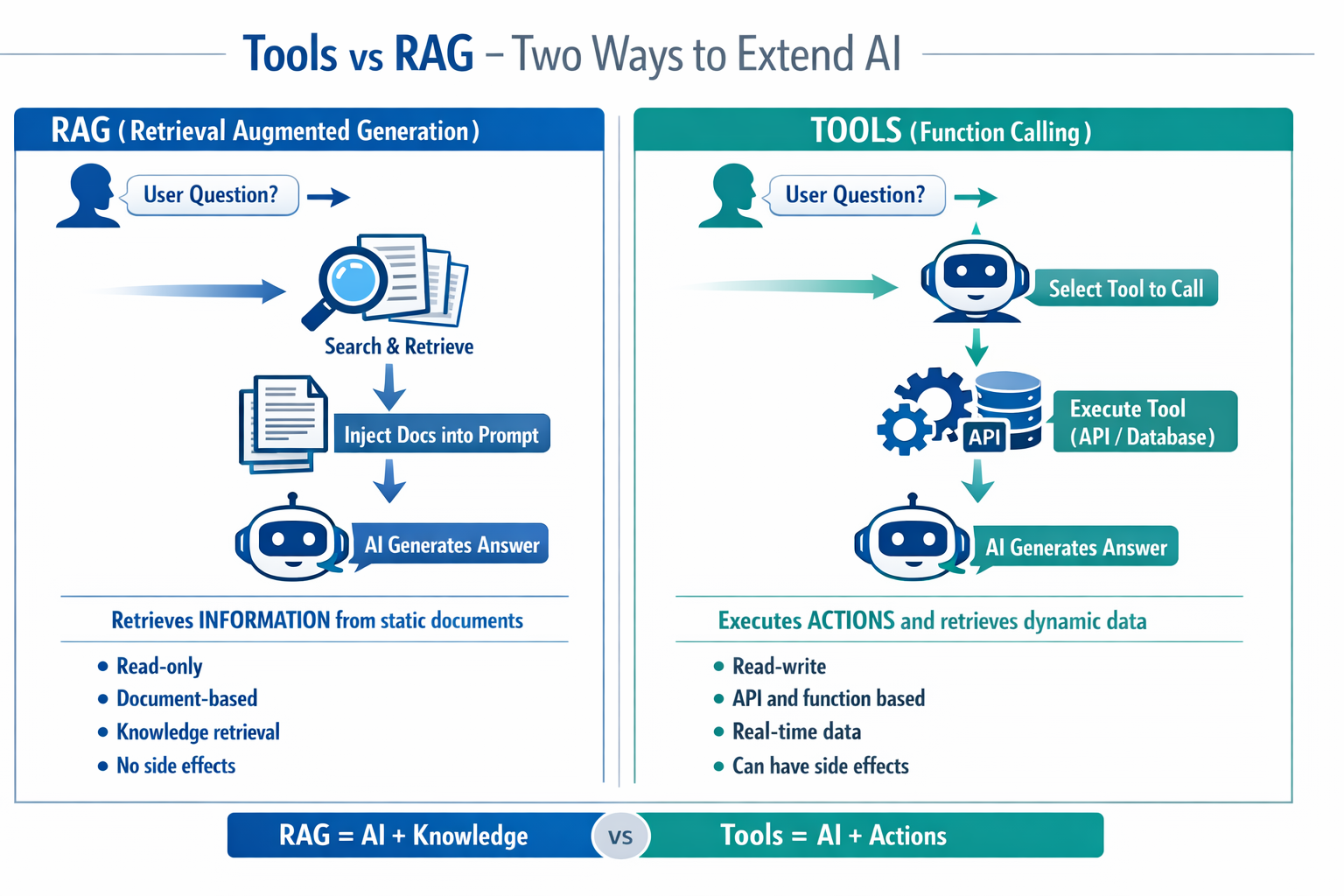
Often you'll use both — RAG to look up policy, a tool to actually file the request.
Real-world use case: A travel assistant uses RAG to answer "What's your cancellation policy?" (from docs) and a tool to "cancel my booking for Friday" (a live action). Same assistant, two capabilities, chosen automatically.
✅ Checkpoint
- What is tool chaining, and who decides the order?
- How should a tool signal failure?
- Give one question best answered by RAG and one best answered by a tool.
Answers: 1) The model calling multiple tools in sequence within one turn, piping one's output into the next; the model decides the order. 2) By returning a clear error message (not throwing), so the agent can explain it. 3) RAG: "What's our refund policy?"; Tool: "What's the weather right now?"
Key Takeaway: Agents get powerful when the model chains tools autonomously in a single turn and fails gracefully by returning error messages instead of crashing. Session memory keeps multi-turn tool use coherent. Choose RAG for answers that live in your documents and tools for live actions or fresh data — and combine them when a task needs both knowledge and action.
Further Learning
Part of "Spring AI for Beginners." Adapted from Microsoft's open Spring AI curriculum (MIT License).