"@Tool puts tools inside your app. MCP lets your app use tools that live anywhere — a shared standard, like USB-C for AI."
Level: Intermediate · Time: ~3–4 days · Prerequisites: Modules 11–12
Learning Objectives
By the end of this module, you will be able to:
- Explain what MCP is and why it exists
- Describe the client–server model of MCP
- Expose a tool with
@McpToolon a server - Discover and call remote tools from a client
1. Why MCP?
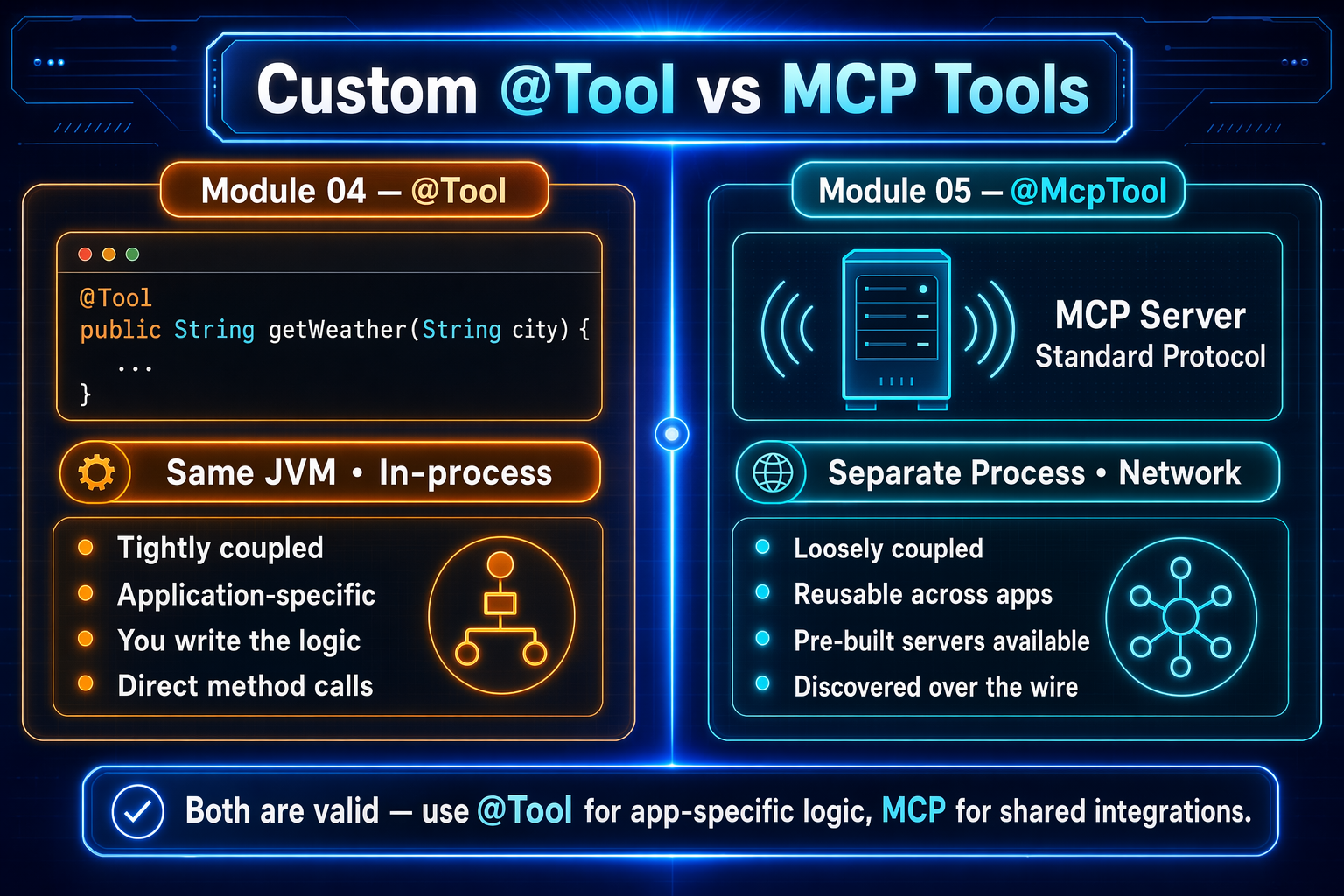
In Module 11 your tools lived inside your app with @Tool. That's perfect when tools are tightly coupled to your code. But real tools often live elsewhere — a microservice, a third-party API, shared company infrastructure.
MCP (Model Context Protocol) is an open standard for connecting AI apps to tools that run outside the app. It gives you:
- a universal protocol any AI app can speak,
- service separation (tools run in their own process),
- auto-discovery (clients learn available tools at connect time), and
- cross-language support (server and client can be different languages).
Explain like I'm new: Before USB-C, every device had its own charger. MCP is USB-C for AI tools — one standard plug, so any AI app can connect to any tool server without custom wiring.
2. The Client–Server Model
MCP has two roles:
- MCP server — hosts tools and publishes a catalog of them.
- MCP client — your AI app; it connects, asks "what tools do you have?", and calls them by name.
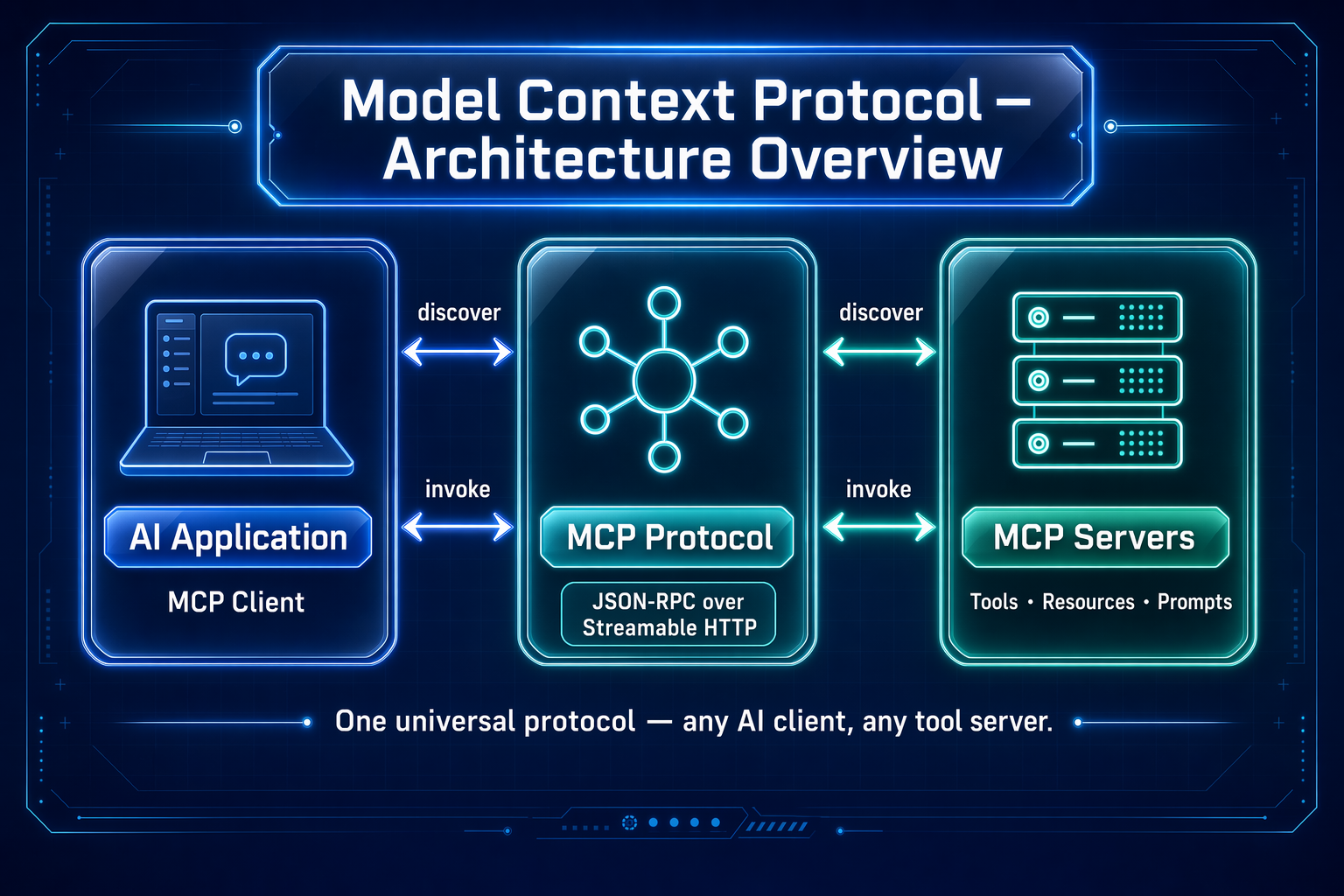
Communication uses JSON-RPC over a transport (this module uses modern Streamable HTTP). Tool schemas are exchanged during a discovery step, so the client always knows what's available.
Concept: Discovery is the magic. The client doesn't hard-code the tool list — it asks the server at startup. Add a tool to the server, restart, and the client can use it, no client code changes.
3. The Server Side: @McpTool
On an MCP server (a Spring Boot app with the MCP server starter), you expose tools with @McpTool — just like @Tool, but reachable over the network:
[object Object],
,[object Object], String ,[object Object],[object Object], {
    ,[object Object], gameEngine.move(gameId, position, player);
}
A server can expose many tools (start a game, make a move, get the board). An MCP tool can even call an LLM itself — the demo's aiMove uses a ChatClient on the server to pick the best move.
4. The Client Side: Two Ways to Call
The client uses Spring AI's ToolCallbackProvider, which connects, discovers, and gives you ready-to-use tool objects. There are two ways to use them:
- Direct call — your code picks the tool:
toolCallback.call(args). Great for buttons and fixed actions. - Agent-style — hand the whole provider to a
ChatClient; the model reads the tool descriptions and decides which to call from a natural-language request.
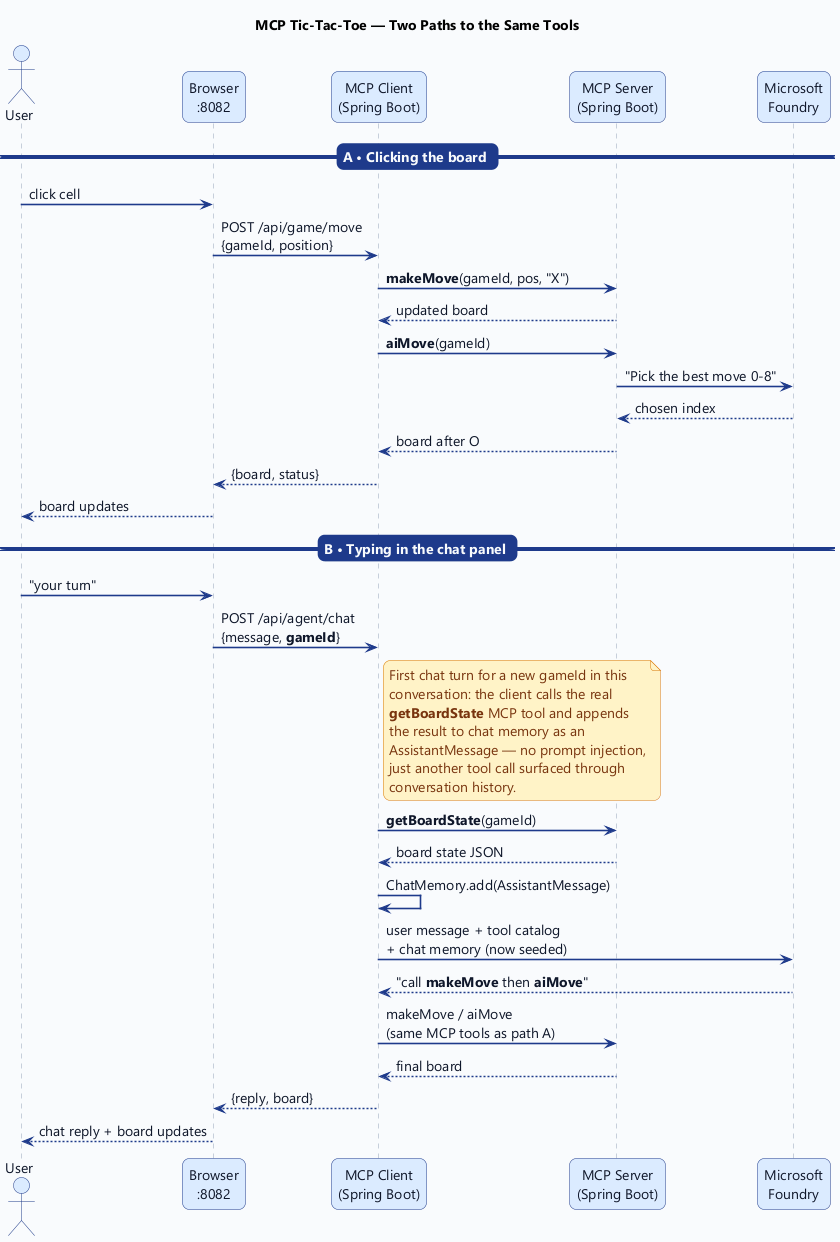
Concept: The only difference between the two paths is who decides — your code or the model. Both hit the same MCP server, so a clicked button and a typed request stay perfectly in sync.
Common mistake: Reaching for MCP when a simple in-process @Tool would do. MCP shines when tools are shared, remote, or cross-language. For a tool only your app uses, @Tool is simpler.
✅ Checkpoint
- What problem does MCP solve that
@Tooldoesn't? - What are the two roles in MCP, and what does each do?
- What's the difference between a direct MCP call and an agent-style call?
Answers: 1) It lets your app use tools that live outside it, via a shared standard — remote, independently deployed, any language. 2) The server hosts and publishes tools; the client connects, discovers, and calls them. 3) Direct: your code picks the tool; agent-style: the model reads tool descriptions and decides.
Key Takeaway: MCP is an open, "USB-C for AI" standard for connecting apps to tools that live outside the app. It uses a client–server model with auto-discovery: servers expose tools via @McpTool, and clients use Spring AI's ToolCallbackProvider to discover and call them — either directly (your code decides) or agent-style (the model decides). Use MCP for shared/remote tools; use @Tool for in-process ones.
Further Learning
Part of "Spring AI for Beginners." Adapted from Microsoft's open Spring AI curriculum (MIT License).