"A chat model can only talk. Give it tools and it can act — check the weather, do the math, query your database — then answer with real data."
Level: Intermediate · Time: ~3–4 days · Prerequisites: Modules 4–7
Learning Objectives
By the end of this module, you will be able to:
- Explain why tools make models far more useful
- Describe the ReAct (Reason–Act–Observe) loop
- Define a tool with
@Tooland@ToolParam - Understand how the model decides which tool to call
1. Why Tools?
On its own, a model only knows its training data. Ask "What's the weather in Seattle right now?" and it can only guess. A tool is a function you let the model call — to hit a live API, run a calculation, or look something up — so it can answer with real, current facts.
Tools break the model out of its training-data bubble. The same model that can't possibly know today's exchange rate can call a currency API and report it accurately; the model that's shaky at arithmetic can call a calculator and get it right every time. You supply the capabilities; the model supplies the judgment about when to use them.
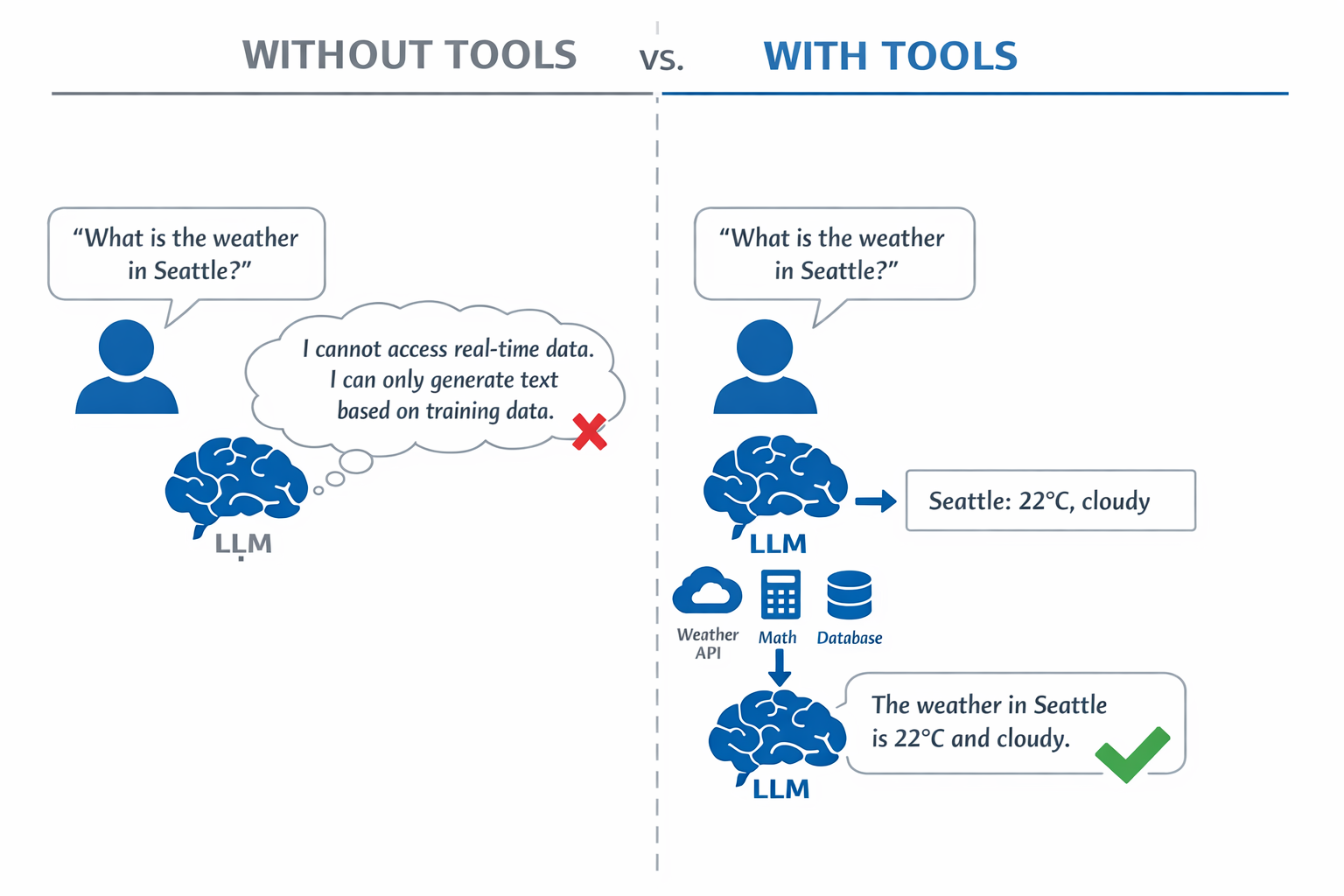
Explain like I'm new: Think of the model as a smart friend on the phone. Tools are the apps on their phone — a weather app, a calculator. Now instead of guessing, they can open an app, get the real number, and tell you.
2. The ReAct Loop
A tool-using agent follows ReAct — Reason, Act, Observe:
- Reason — figure out what info is needed.
- Act — pick the right tool and call it with the right arguments.
- Observe — read the tool's result.
- Repeat or Respond — loop if more is needed, else answer in plain language.
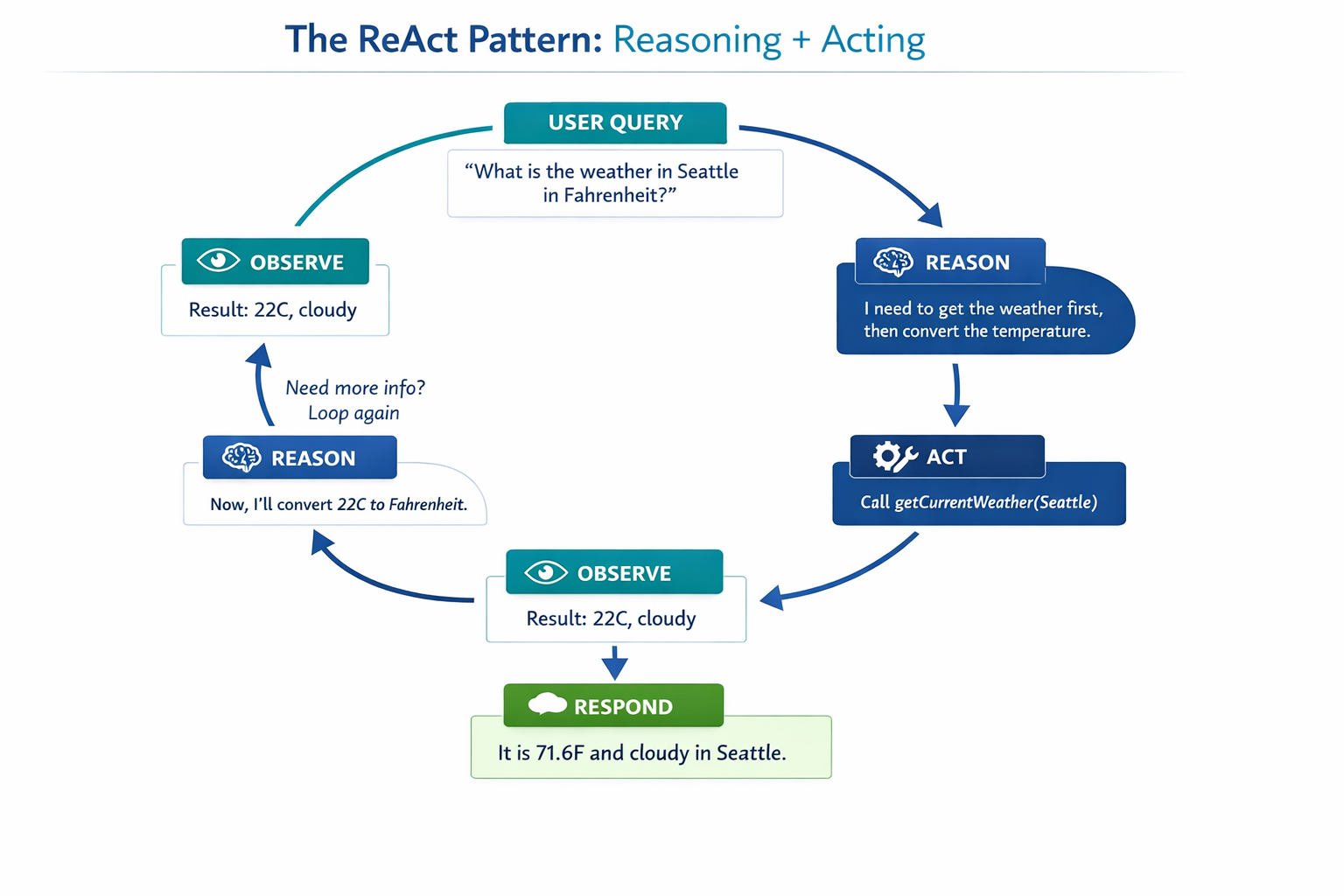
The best part: this happens automatically. You define the tools; the model decides when and how to use them.
Explain like I'm new: ReAct is just how a careful person handles a question they can't answer offhand: think about what's missing, look it up, read the result, then reply. The model runs that same loop — sometimes several times — before it speaks.
Concept: "Agent" here means a chat model plus tools following the ReAct loop. (The fuller "agentic patterns" — planning and multi-step workflows — come in Module 14.)
3. Defining a Tool
In Spring AI you mark a normal Java method with @Tool and describe its parameters with @ToolParam. The description is how the model knows what the tool does.
[object Object], ,[object Object], ,[object Object], {

    ,[object Object],
    ,[object Object], String ,[object Object],[object Object], {
        ,[object Object],
        ,[object Object], ,[object Object], + location + ,[object Object],;
    }
}Then hand the tool to the ChatClient at call time:
[object Object], ,[object Object], ,[object Object], chatClient.prompt()
        .tools(,[object Object], ,[object Object],())
        .user(message)
        .call()
        .content();
Spring AI executes the call for you — no manual JSON, no wiring.
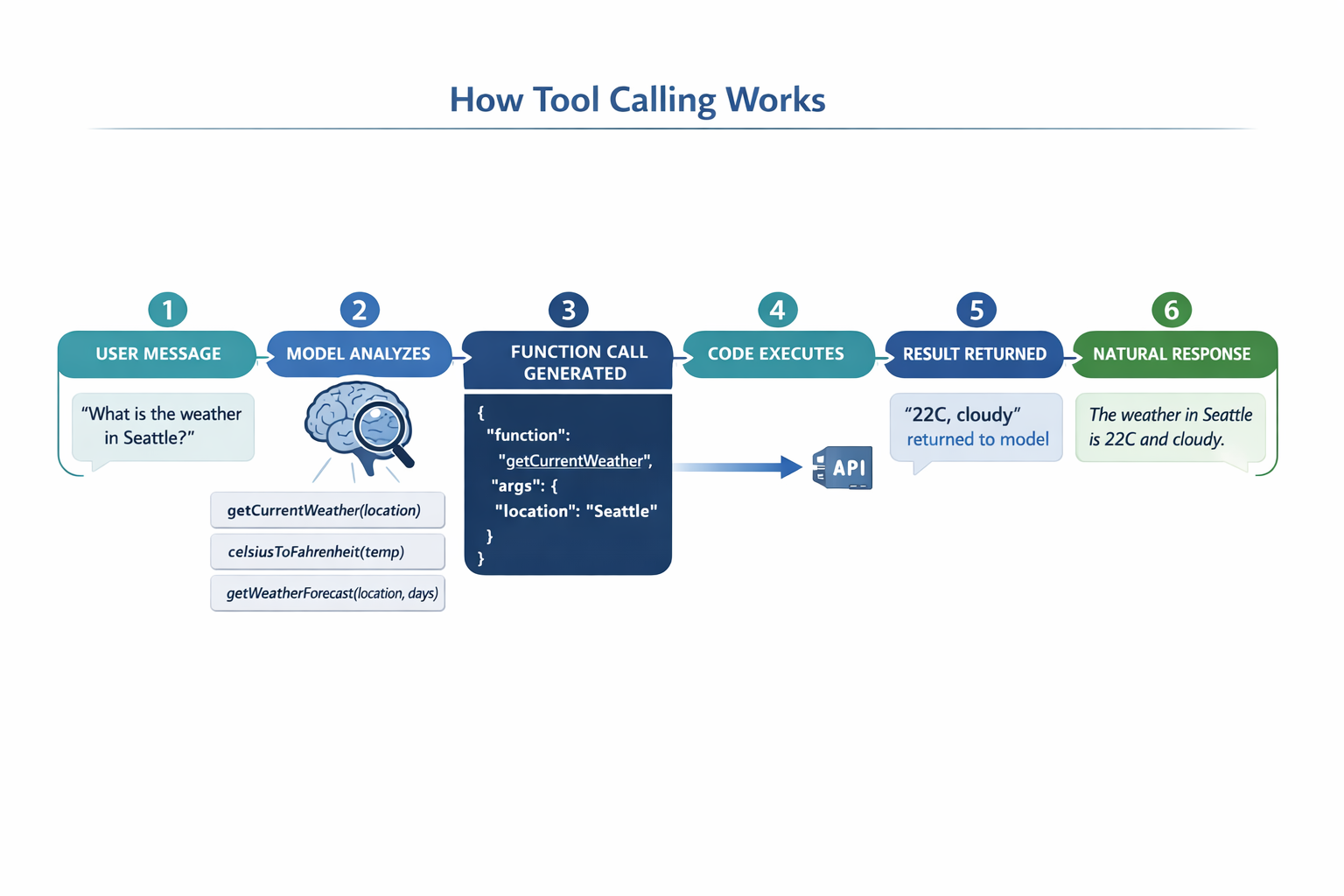
Behind that simplicity, Spring AI translates your annotated method into a schema the model understands, detects when the model wants to call it, invokes your Java code with the model's chosen arguments, and feeds the result back into the conversation — a multi-step dance you never have to write.
Concept: The @Tool description is the interface between the model and your code. Vague descriptions lead to the wrong tool being called; clear, specific ones lead to reliable behavior.
4. How the Model Chooses
When you ask "What's the weather in Seattle?", the model compares your intent against every tool description, scores them, and picks the best — then fills in the parameters (location = "Seattle"). If nothing matches, it just answers from its own knowledge.
Common mistake: Writing tool descriptions like "weather" or "helper". The model can't tell when to use them. Describe the action and when to use it: "Get the current weather for a location".
✅ Checkpoint
- What can a model do with tools that it can't do alone?
- What are the four steps of the ReAct loop?
- What do
@Tooland@ToolParamdescribe?
Answers: 1) Take real actions — call live APIs, run calculations, query data — and answer with real results instead of guessing. 2) Reason, Act, Observe, Repeat-or-Respond. 3) @Tool describes what the method does and when to use it; @ToolParam describes each parameter.
Key Takeaway: Tools turn a talking model into an acting agent. Following the ReAct loop (reason → act → observe → repeat), the model autonomously decides which tool to call and with what arguments. In Spring AI you just annotate a Java method with @Tool (and @ToolParam) and pass it via .tools() — clear descriptions are what make the model choose correctly.
Further Learning
Part of "Spring AI for Beginners." Adapted from Microsoft's open Spring AI curriculum (MIT License).