"You just built RAG by hand. Now let Spring AI do the heavy lifting in a single line — and learn the tuning knobs that make RAG actually good."
Level: Intermediate · Time: ~3 days · Prerequisites: Module 9
Learning Objectives
By the end of this module, you will be able to:
- Choose between native, advisor-based, and ETL RAG
- Use
QuestionAnswerAdvisorfor one-line RAG - Tune chunk size,
topK, and similarity threshold - Apply best practices that keep answers accurate
1. Three Ways to Do RAG in Spring AI
Spring AI offers the same result at three levels of abstraction:
| Approach | What you write | Trade-off |
|---|---|---|
| Native | You search, assemble context, and build the prompt yourself (Module 9) | Most code, but every step is visible |
| Advisor-based | QuestionAnswerAdvisor retrieves and injects context automatically | Least code — recommended for production |
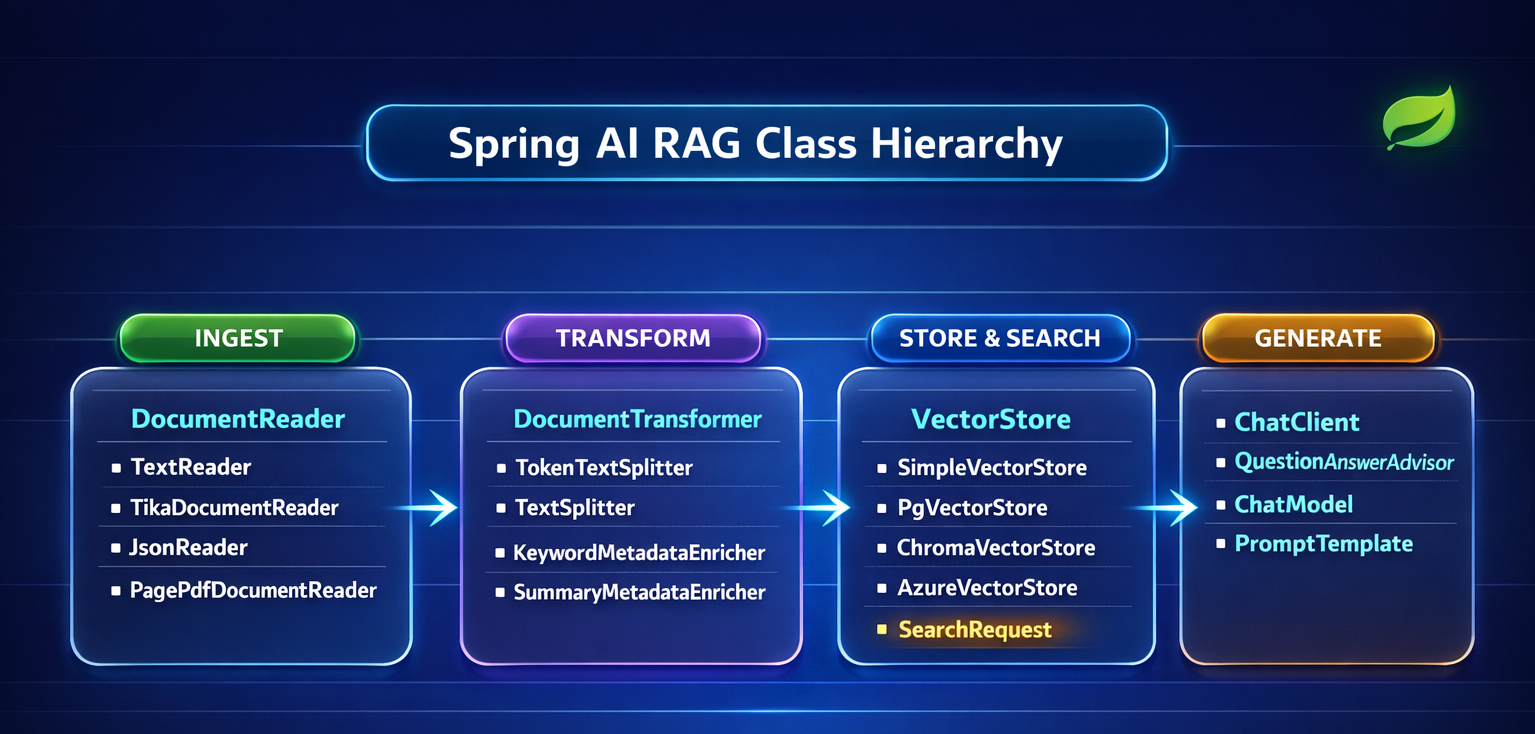
| ETL pipeline | Structured ingestion (DocumentReader → splitter → VectorStore) + advisor for queries | Best of both |
Concept: Building RAG by hand first (Module 9) means you actually understand what the advisor does for you. Now you can use the shortcut without it being magic.
2. One-Line RAG with QuestionAnswerAdvisor
The advisor plugs into your ChatClient. It embeds the question, searches the vector store, and injects the matching chunks into the prompt — all automatically:
[object Object], ,[object Object], ,[object Object], chatClient.prompt()
        .user(question)
        .advisors(,[object Object], ,[object Object],(vectorStore))
        .call()
        .content();
That's the entire query side of RAG. Compare it to the manual version from Module 9 — same outcome, a fraction of the code.
Under the hood the advisor does exactly what you coded by hand last module: embed the question, run similaritySearch, and splice the winning chunks into the prompt before it reaches the model. The difference is that Spring AI maintains this plumbing for you, so upgrades and bug fixes come for free.
Concept: Remember advisors from Module 5 (memory)? Same idea, different job. A QuestionAnswerAdvisor wraps each call to add document context. You can even stack advisors — memory and RAG together.
3. The Tuning Knobs
RAG quality depends on a few settings. Get these right and answers feel magical; get them wrong and they feel random. There's no universal "correct" value — the sweet spot depends on your documents and questions, so treat these as dials to test, not settings to memorize.
- Chunk size — too big and searches are imprecise; too small and chunks lose context. A few hundred tokens is a common starting point.
- Overlap — a little (e.g., 10%) preserves meaning across boundaries.
topK— how many chunks to retrieve. More context isn't always better; 3–5 is a good start.similarityThreshold— the minimum relevance score. Raise it to exclude weak matches.
Try this: Ask the same question with topK set to 1, then 5, then 15. You'll feel the trade-off: too few misses context, too many drowns the answer in noise.
4. Best Practices
- Store metadata (filename, page) with each chunk so you can cite sources in the answer — huge for trust.
- Tell the model to say "I don't know" when the context lacks the answer. This is your strongest anti-hallucination guardrail.
- Keep ingestion separate from querying — embed documents once, query many times.
- Re-ingest when documents change — RAG reflects whatever is in the store right now.
Real-world use case: A legal team's RAG assistant cites the file name and page for every answer. Lawyers don't have to trust the model blindly — they click straight to the source clause to confirm it, which is what makes the tool usable in a high-stakes setting.
Common mistake: Skipping the "if it's not in the context, say so" instruction. Without it, the model falls back on training-data guesses and quietly reintroduces the hallucinations RAG was meant to prevent.
✅ Checkpoint
- Which RAG approach is recommended for production, and why?
- What does
QuestionAnswerAdvisordo automatically? - Name two best practices that improve trust or accuracy.
Answers: 1) Advisor-based — least code, retrieval and injection handled for you. 2) Embeds the question, searches the vector store, and injects matching chunks into the prompt. 3) Any two: store metadata to cite sources; instruct the model to say "I don't know"; separate ingestion from querying; re-ingest on changes.
Key Takeaway: Spring AI offers RAG at three levels — native (full control), advisor-based (one line via QuestionAnswerAdvisor, recommended), and ETL (structured ingestion + advisor). Quality comes from tuning chunk size, overlap, topK, and similarityThreshold, storing metadata to cite sources, and always telling the model to admit when the answer isn't in the context.
Further Learning
Part of "Spring AI for Beginners." Adapted from Microsoft's open Spring AI curriculum (MIT License).