"You don't always need to write every line. Low-code tools and AutoML let you build models by pointing, clicking, and guiding."
Learning Objectives
By the end of this module, you will be able to:
- Explain low-code data science
- Understand what AutoML does
- Know when these tools help (and their limits)
1. Low-Code Data Science
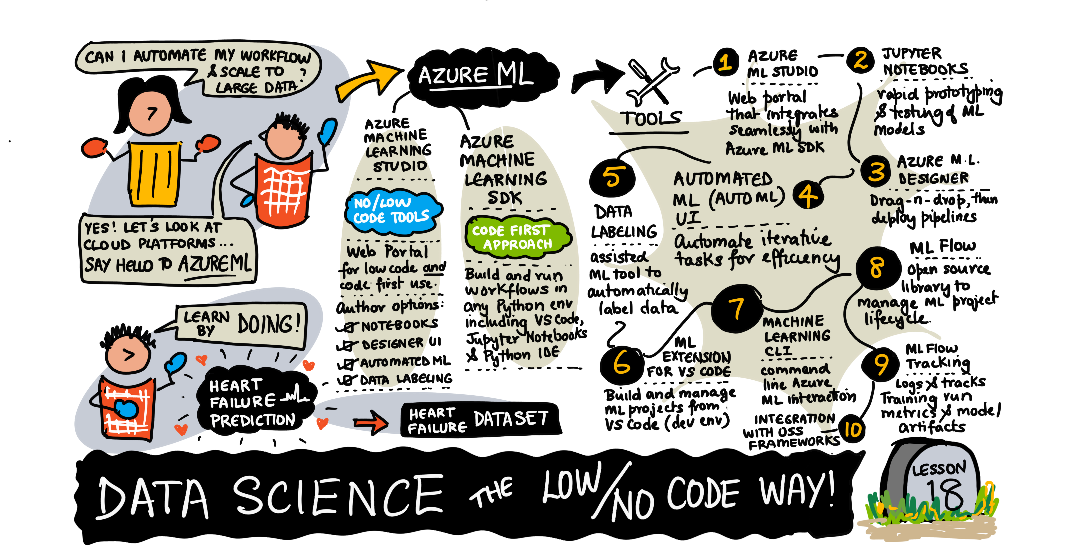
Low-code tools let you do data science mostly through visual interfaces — drag-and-drop steps, menus, and forms — with little or no programming.
Key idea: Low-code lowers the entry barrier. Someone who understands the problem but not much code can still clean data, build a chart, or train a model — and get to a useful result fast.
Explain like I'm new: Compare building a website by hand-writing HTML versus using a drag-and-drop site builder. Both make a website; one just skips the typing. Low-code data tools work the same way — you assemble a pipeline visually instead of coding every step, so the idea matters more than the syntax.
In a typical low-code tool, each step of your work becomes a block you drag onto a canvas — "load this file," "remove empty rows," "train a model," "show a chart" — and you connect the blocks with arrows to form a flow. You can see the whole pipeline at a glance, tweak a setting by clicking a menu, and re-run it with one button. The trade-off is flexibility: anything the tool didn't build a block for is hard or impossible to do. For common, well-trodden tasks that's rarely a problem; for something unusual, you'll eventually want real code. Low-code is a fast on-ramp, not a permanent ceiling.
2. AutoML
AutoML (Automated Machine Learning) automates the tedious parts of modeling: it tries many algorithms and settings for you, then reports the best one.
Building a model by hand involves a lot of trial and error: picking an algorithm, choosing its settings (called hyperparameters), training it, checking the score, and repeating dozens of times to find what works. This is exactly the kind of patient, repetitive search a computer does better than a human. AutoML systematically works through the combinations — often smartly, focusing on the settings that look promising — and hands you a ranked leaderboard. What might take a person a week of tinkering, AutoML can grind through in an hour, while you go do something more valuable, like understanding what the result actually means.
Simple example: Instead of hand-testing regression, random forest, and gradient boosting yourself, AutoML runs them all, tunes each, and hands you a leaderboard of what worked best — in one job.
Real-world use case: A marketing analyst wants to predict which leads will convert. She has clean data but no time to hand-tune models. She points AutoML at the dataset, tells it the column to predict, and an hour later gets a ranked list of models with accuracy scores. She picks the top one, checks that its predictions make sense, and ships it — work that might have taken a coder several days.
3. When to Use — and Their Limits
Great for: quick prototypes, learning, non-coders, and strong baselines.
Think of AutoML as a very fast, tireless assistant that tries every reasonable combination while you sleep. It is excellent at the search, but it has no idea whether your data was fair, whether a column secretly leaked the answer, or whether the problem was worth solving. Those judgments are still yours. Where these tools struggle is with the unusual — a novel data type, a custom loss, or a problem no template covers — which is exactly where hand-written code and human insight earn their keep.
Common mistake: Treating AutoML as a "magic button" that removes the need to understand your data. It still needs clean, fair, well-chosen data (Modules 10–11) — and you must understand the result to trust and explain it. AutoML speeds the how, not the thinking.
Data scientist tip: Use AutoML to set a strong baseline fast, then decide if a hand-crafted model is worth the extra effort. Often the automated result is good enough — and knowing that saves days.
Key Takeaway: Low-code tools enable data science through visual interfaces with little coding, and AutoML automatically tries and tunes many models to find the best. Both speed up work and lower barriers — but they don't replace good data or understanding. Use them for fast baselines and prototypes, then judge whether to go further.
Further Learning
Adapted from Microsoft's Data Science for Beginners (MIT License). Sketchnote by Nitya Narasimhan.