"Memory is what turns a clever autocomplete into a real assistant. Here's how Spring AI gives your app a memory — and why tokens set its limits."
Level: Beginner · Time: ~2–3 days · Prerequisites: Module 4
Learning Objectives
By the end of this module, you will be able to:
- Explain what tokens are and why they matter
- Describe how conversation memory works
- Use
MessageWindowChatMemoryand a memory advisor - Understand how a conversation ID keeps chats separate
1. What Are Tokens?
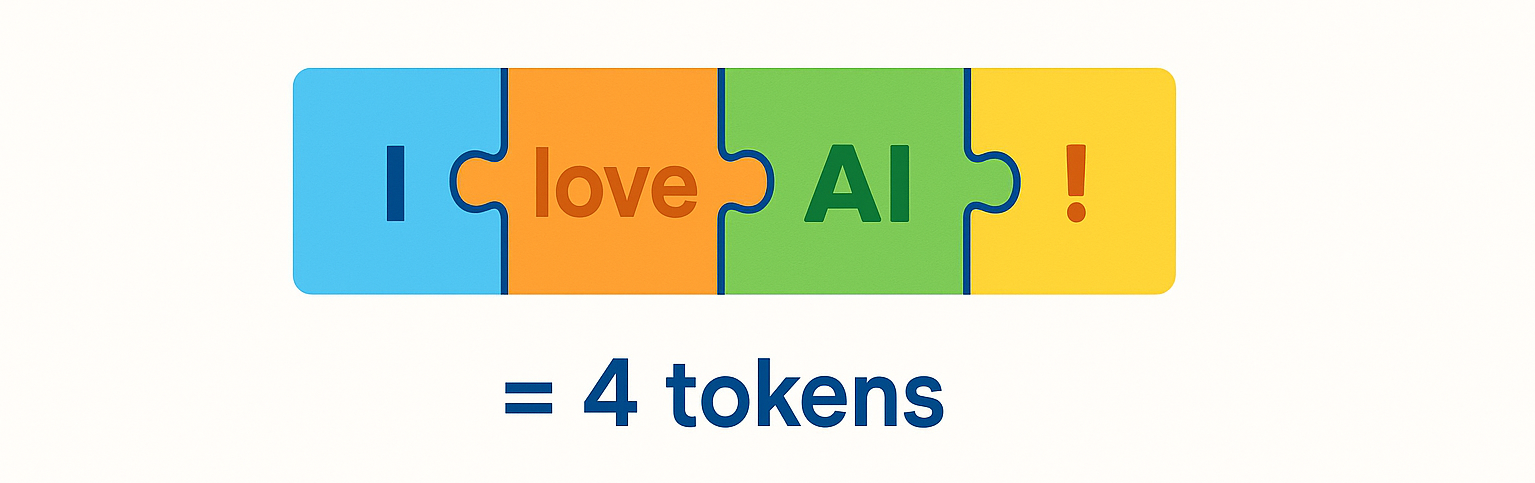
Models don't read words — they read tokens, small chunks of text. A token is roughly ¾ of a word; punctuation and spaces can be tokens too. "I love AI!" might become four tokens.
Two reasons tokens matter to you:
- Limits: every model has a maximum number of tokens it can consider at once (its context window). Go over, and older content must be dropped.
- Cost: providers charge per token. Longer prompts and longer histories cost more.
A quick feel for scale: a chat model might have a 128,000-token context window, and a single page of text is roughly 500 tokens. A long conversation plus a few retrieved documents adds up fast — and because you pay per token on both the input you send and the output you get back, trimming needless history is real money saved.
Concept: Every message you keep "in memory" is re-sent to the model on the next call — and counts as tokens. Memory isn't free; it's a trade-off between context and cost.
2. How Memory Works
Since the model forgets, your app must remember. Before each new request, Spring AI prepends the earlier messages so the model sees the whole conversation. When you ask "What's my name?", the model actually receives your earlier "My name is John" too — so it can answer.
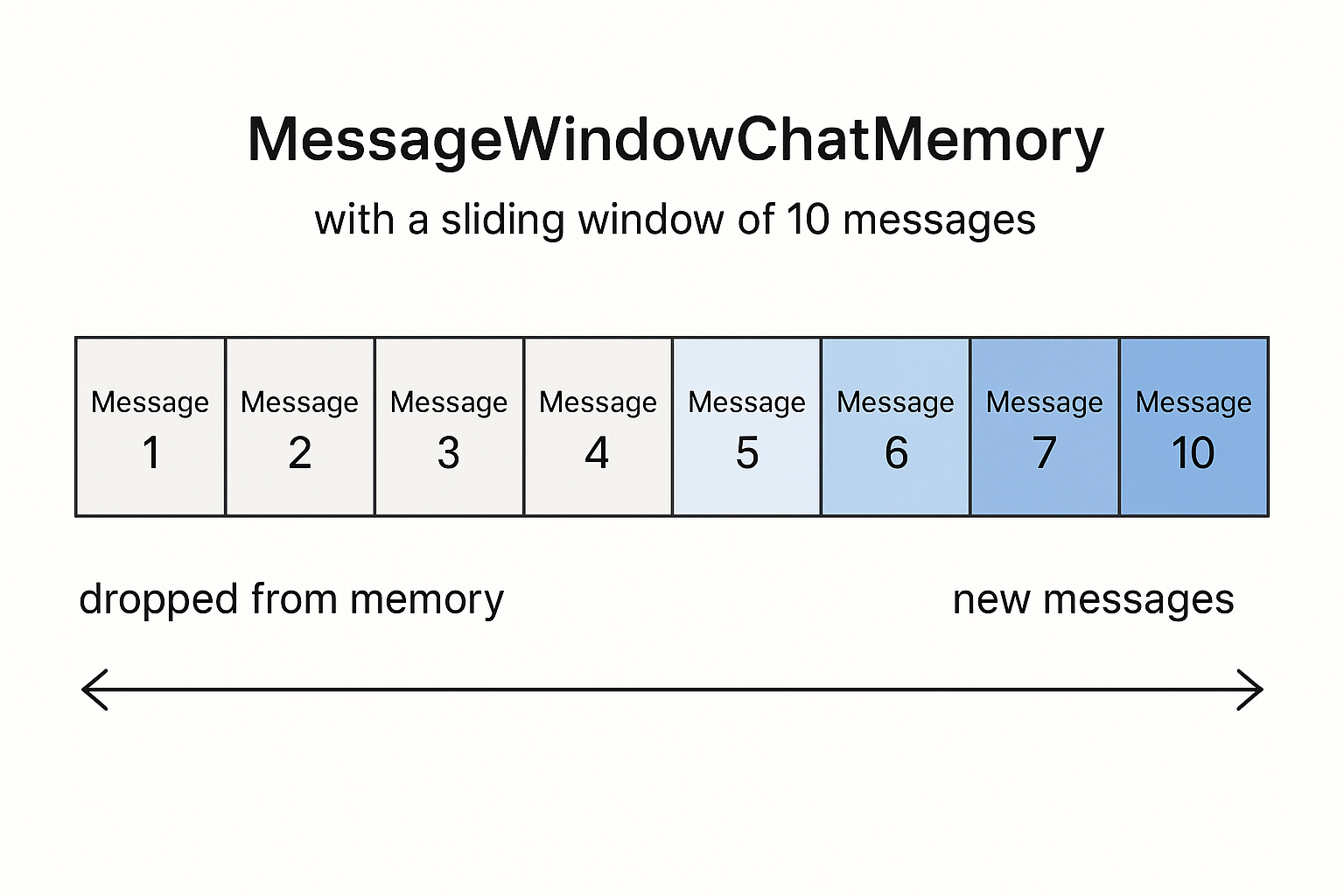
But you can't keep everything — you'd blow the token limit. The fix is a sliding window: keep the most recent N messages and quietly drop the oldest.
Explain like I'm new: Memory is like a whiteboard with limited space. Each new note goes on; when it's full, you erase the top (oldest) note to make room. You always see the recent conversation, never the ancient history.
3. MessageWindowChatMemory
Spring AI implements exactly that sliding window with MessageWindowChatMemory. You configure it once as a bean:
[object Object],
ChatMemory ,[object Object],[object Object], {
    ,[object Object], MessageWindowChatMemory.builder()
            .chatMemoryRepository(repository)
            .maxMessages(,[object Object],)          ,[object Object],
            .build();
}Here it keeps the last 10 messages and trims older ones automatically. The repository is where messages are stored — in this demo, an InMemoryChatMemoryRepository (great for learning; swap for a database in production).
In-memory storage means the history vanishes when the app restarts — fine while you learn, but a real deployment would use a JDBC- or Redis-backed repository so conversations survive restarts and can be shared across multiple server instances.
4. The Memory Advisor
You don't manually stitch messages together. Spring AI's MessageChatMemoryAdvisor does it for you: it loads prior turns before each call and saves the new exchange after.
[object Object],.chatClient = chatClientBuilder
        .defaultAdvisors(MessageChatMemoryAdvisor.builder(chatMemory).build())
        .build();
Concept: An advisor is a plug-in that wraps around each model call to add behavior — here, memory. Later you'll meet RAG advisors that inject document context. Advisors are how Spring AI adds "smarts" without cluttering your code.
5. Keeping Conversations Separate
If two users chat at once, their histories must not mix. A conversation ID scopes memory per chat:
chatClient.prompt()
        .user(message)
        .advisors(a -> a.param(ChatMemory.CONVERSATION_ID, conversationId))
        .call()
        .content();
Each user (or session) gets a unique ID, so everyone's memory stays isolated.
Real-world use case: A customer-support site generates a fresh conversation ID per browser session. Two shoppers chatting at the same moment never see each other's messages, even though every request hits the same ChatClient bean on the same server.
Common mistake: Setting maxMessages too high "to be safe." Bigger windows mean more tokens per call — slower and more expensive — and can still overflow the context limit. Keep just enough history to stay coherent.
✅ Checkpoint
- What is a token, roughly?
- Why can't you keep unlimited conversation history?
- What does
MessageChatMemoryAdvisordo for you?
Answers: 1) A small chunk of text (~¾ of a word) that the model processes. 2) The context window has a token limit, and more tokens cost more — so old messages must be dropped. 3) It automatically loads past messages before each call and saves the new exchange after.
Key Takeaway: Models process text as tokens, and their context window limits how much they can hold — which also drives cost. Because models forget, your app remembers by re-sending recent messages. Spring AI's MessageWindowChatMemory keeps a sliding window of the last N messages, the MessageChatMemoryAdvisor wires it in automatically, and a conversation ID keeps each user's chat separate.
Further Learning
Part of "Spring AI for Beginners." Adapted from Microsoft's open Spring AI curriculum (MIT License).