"Two lines of Spring AI and your app can talk to an AI model. Let's write them — and then make the AI remember you."
Level: Beginner · Time: ~2–3 days · Prerequisites: Modules 1–3
Learning Objectives
By the end of this module, you will be able to:
- Send a prompt to an AI model with
ChatClient - Explain the difference between stateless and stateful chat
- Understand why memory matters for real conversations
- Read the core code of a working chat app
1. Meet the ChatClient
Spring AI's main tool for talking to a model is the ChatClient. It has a friendly, fluent style: build a prompt, call the model, get the content.
[object Object], ,[object Object], ,[object Object], chatClient
        .prompt()
        .user(,[object Object],)
        .call()
        .content();
That's it. ChatClient handles the HTTP request, authentication, and response parsing. You wire it up once as a bean (remember dependency injection from Module 2) and use it anywhere.
Concept: ChatClient is a thin, friendly wrapper over the raw model. It's the object you'll use in almost every module. Learn it well and everything else clicks into place.
2. The Problem: Models Forget
AI language models are stateless — every request is treated as brand new. If you tell the model "My name is John" and then ask "What's my name?", it has no idea. It never saw your first message; each call stands alone.
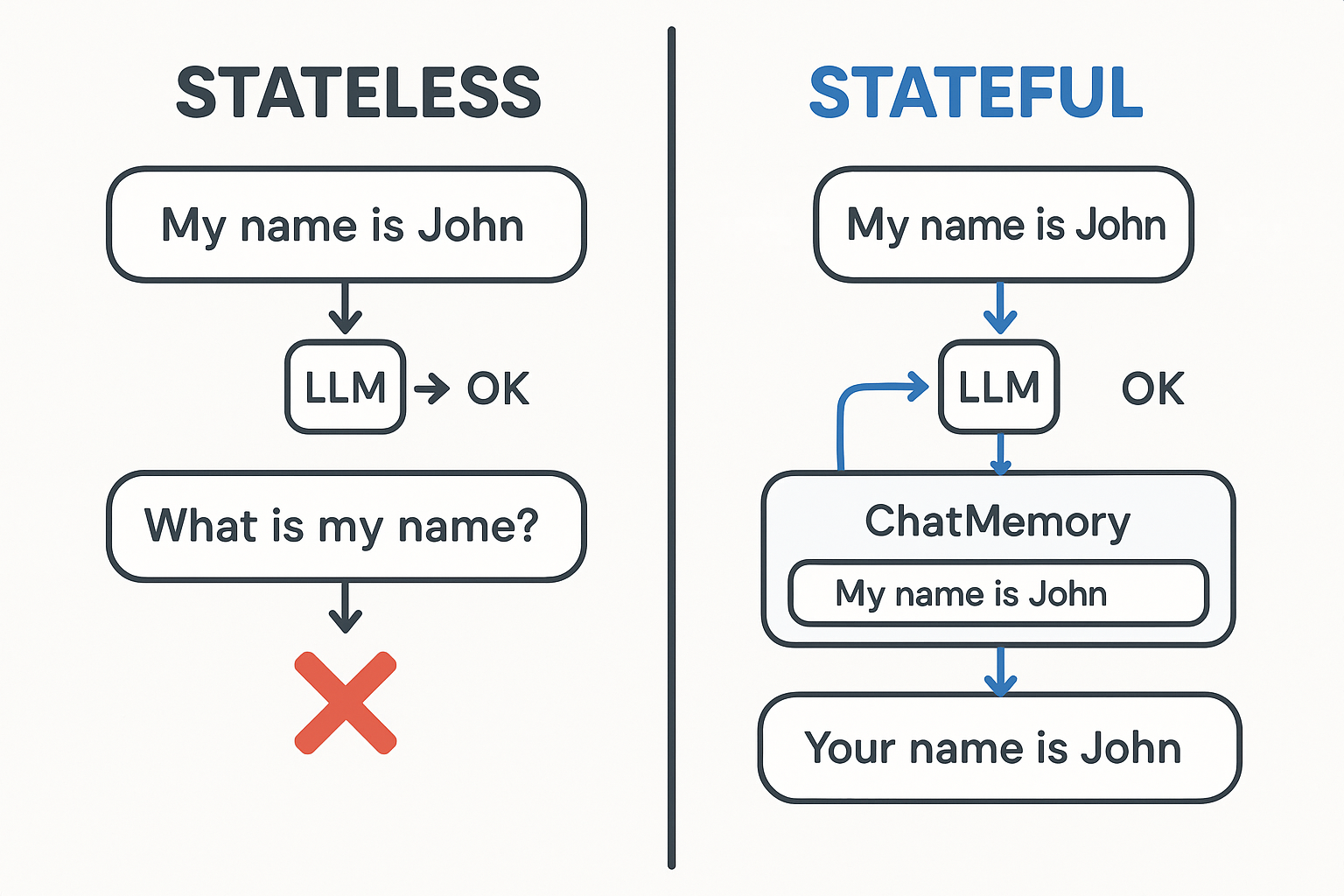
This is fine for one-off questions, but useless for a real assistant. Customer-support bots, tutors, and copilots all need to remember what was said.
Explain like I'm new: A stateless model is like talking to someone with no short-term memory. Every sentence, they've forgotten the last one. Useful for trivia, hopeless for a conversation.
3. Two Panels, One Model
The starter app shows both behaviors side by side, using the same gpt-4o-mini model — the only difference is memory:
- Stateless chat (left): each message is independent. Say "My name is John," then ask "What's my name?" → it can't tell you.
- Stateful chat (right): the app keeps a running history. Same two messages → it answers "John."
Try this: Run both panels and send the exact same two messages to each. Seeing one panel forget and the other remember — with the same model — makes the value of memory unforgettable.
4. The Code Behind Each Panel
The stateless endpoint builds a plain ChatClient and calls it directly:
[object Object], ,[object Object], ,[object Object], chatClient.prompt().user(message).call().content();The stateful endpoint adds a memory advisor (you'll go deep on this next module). The advisor quietly loads the past messages before each call and saves the new exchange after:
[object Object], ,[object Object], ,[object Object], chatClient.prompt()
        .user(message)
        .advisors(a -> a.param(ChatMemory.CONVERSATION_ID, conversationId))
        .call()
        .content();
Same model, same ChatClient API — one just has memory attached.
Real-world use case: A help-desk assistant must remember the customer's order number mentioned three messages ago. Stateful chat makes that automatic; stateless chat would force the user to repeat themselves every time.
5. From Console to Web
Because it's Spring Boot, exposing your chat over the web is just a @RestController method that takes the user's message and returns the model's reply. The browser sends text, your controller calls the ChatClient, and the answer comes back — a complete AI feature in a few lines.
Common mistake: Building a "chatbot" with a stateless call and then wondering why it feels dumb and forgetful. If your assistant should remember anything within a session, you need memory — the topic of the next module.
✅ Checkpoint
- Which Spring AI object do you use to send prompts to a model?
- Why can't a stateless chat answer "What's my name?" after you introduced yourself?
- What is the only difference between the two chat panels?
Answers: 1) ChatClient. 2) Each request is independent — the model never saw your earlier message. 3) The stateful panel attaches a memory advisor; both use the same model.
Key Takeaway: ChatClient is your everyday tool for talking to an AI model in Spring AI — build a prompt, .call(), read the .content(). Models are stateless by default, so a real conversation needs memory. The starter app proves the point by running stateless and stateful chat side by side on the same model; only the one with a memory advisor can remember what you said.
Further Learning
Part of "Spring AI for Beginners." Adapted from Microsoft's open Spring AI curriculum (MIT License).