"Building a model is less like writing code and more like coaching. You show it examples, test what it learned, and adjust — again and again — until it's ready for the real world."
Learning Objectives
By the end of this module, you will be able to:
- Walk through the seven steps of a machine learning project
- Explain "features" and "targets" using a simple everyday example
- Understand why we split data into training and testing sets
- Read a short, beginner-friendly piece of Scikit-learn code
- Tell the difference between underfitting and overfitting
1. The Big Picture: Seven Steps
Almost every machine learning project — from a student's first notebook to a system running at a giant company — follows the same rhythm. Learn this rhythm once and every future module will feel familiar.
| Step | What you do | In plain words |
|---|---|---|
| 1. Ask a question | Define what you want to predict | "Can I predict a house's price?" |
| 2. Collect & prepare data | Gather and clean examples | Get past house sales, tidy them up |
| 3. Choose a method | Pick an algorithm to try | "Let's try linear regression" |
| 4. Train the model | Let it learn from examples | Show it thousands of past sales |
| 5. Evaluate | Test it on unseen data | "How close were its guesses?" |
| 6. Tune | Adjust settings to improve | Tweak the dials, try again |
| 7. Predict | Use it on brand-new data | Estimate a new listing's price |
Concept: Notice that steps 3–6 form a loop. You rarely get it right the first time. Machine learning is a cycle of try, measure, adjust, repeat — much like tuning a recipe until it tastes right.
2. Features and Targets: The Ingredients and the Answer
Every ML problem has two kinds of information. Let's use a friendly example: predicting the price of a pumpkin at a market.
- Features are the clues you use to make the prediction — the pumpkin's size, color, variety, and the month it's sold. In code, features are almost always called
X. - The target is the thing you're trying to predict — the price. In code, the target is almost always called
y.
Concept: Features are the questions ("How big? What color? What month?"). The target is the answer ("What price?"). Machine learning learns the connection between the questions and the answer.
Choosing good features is an art. Include clues that actually matter (size probably affects price) and leave out noise (the seller's favorite color probably doesn't). Picking the most useful clues is called feature selection, and it often matters more than which fancy algorithm you choose.
Pro Tip: More features are not always better. Irrelevant clues can actually confuse a model. Start simple, with the features you're confident matter, then add more only if they genuinely help.
3. Splitting Your Data: Study Set vs. Exam Set
Here's a rule that surprises beginners: you must never test a model on the same data it learned from.
Why? Imagine a student who memorizes the exact answers to a practice test. They'll ace that practice test — but they haven't really learned anything, and they'll flop on the real exam. Models can "memorize" in exactly the same way.
So we split our data into two groups:
- Training set (usually ~80%): the "study material" the model learns from.
- Testing set (usually ~20%): a "surprise exam" of examples the model has never seen, used to check whether it truly learned the pattern.
Sometimes we keep a third small slice, the validation set, to help fine-tune the model without touching the final exam.
Warning: Peeking at the test data during training is one of the most common beginner mistakes. It's called data leakage, and it makes a model look brilliant in practice but fail in the real world. Keep that test set locked away until the very end.
4. Training a Model: "Fitting" the Pattern
When the model actually learns, we say it is being trained or fit to the data. In most ML libraries this is a single, satisfying line: model.fit(X, y).
Here's what a complete beginner-friendly workflow looks like using Scikit-learn, Python's most popular classical-ML library. Read the comments — the code is meant to be readable, not scary:
[object Object], sklearn.model_selection ,[object Object], train_test_split
,[object Object], sklearn.linear_model ,[object Object], LinearRegression

,[object Object],
,[object Object],
X_train, X_test, y_train, y_test = train_test_split(X, y, test_size=,[object Object],)

,[object Object],
model = LinearRegression()

,[object Object],
model.fit(X_train, y_train)

,[object Object],
predictions = model.predict(X_test)That's the whole shape of machine learning in seven lines. Every technique in this track — regression, classification, clustering — reuses this same fit / predict pattern. Learn it once, use it forever.
Did You Know? That tidy .fit() / .predict() design is a big reason Scikit-learn became so beloved. Whether you're fitting a simple line or a complex forest of decision trees, the code looks almost identical. Consistency like this is what makes a tool a joy to learn.
5. Evaluating: Did It Actually Learn?
After training, we unlock the test set and ask: how close were the model's predictions to the real answers? We measure this with metrics — numbers that score performance (you'll meet specific ones like accuracy and error in later modules).
Good evaluation is honest evaluation. A model that scores 99% on data it memorized but 60% on new data hasn't really learned — it has cheated. The test-set score is the one that tells the truth.
6. The Goldilocks Problem: Underfitting vs. Overfitting
When a model learns badly, it usually fails in one of two opposite ways. Getting this balance right is the central craft of machine learning.
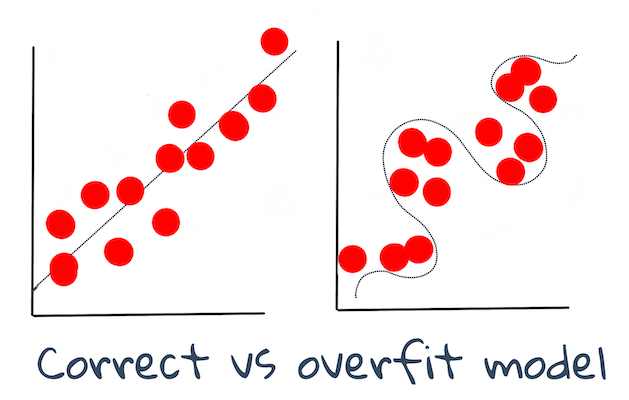
| Underfitting | Just Right | Overfitting | |
|---|---|---|---|
| What happens | Too simple; misses the pattern | Captures the real pattern | Too complex; memorizes noise |
| Student analogy | Didn't study enough | Understood the material | Memorized answers, not ideas |
| On new data | Poor | Good | Poor |
- Underfitting is like a student who barely studied — they miss the point entirely, on both practice and real exams.
- Overfitting is the memorizer — dazzling on the practice test, lost on the real one, because they learned the noise instead of the lesson.
- The sweet spot in the middle is what we're always aiming for: a model that captures the true pattern and generalizes to new data.
Concept: The whole goal of machine learning is generalization — performing well on data the model has never seen. A model that only shines on its training data is useless in the real world.
7. Tuning and Predicting
If the evaluation isn't good enough, we tune: adjust the model's settings (called hyperparameters — think of them as the dials on the algorithm) and train again. This is the try-measure-adjust loop in action.
Once the model performs well on unseen data, it's ready for the final step: prediction. In a real product, this might mean a user clicks a button, their input flows into the model, and an answer comes back in milliseconds — a movie recommendation, a price estimate, a fraud alert.
Try This! Sketch the seven steps as a flowchart on paper, then pick a prediction you'd love to make (Will it rain tomorrow? Will this email get a reply?). For each step, jot one sentence about how it'd apply. This turns the abstract workflow into something concrete and personal — the fastest way to make it stick.
Key Takeaway: Every ML project follows the same rhythm: ask, gather data, choose a method, train, evaluate, tune, predict. You learn from features (X) to predict a target (y), you always test on unseen data, and you steer between underfitting (too simple) and overfitting (memorizing) toward a model that generalizes. Master this loop and you've mastered the backbone of machine learning.
This module is adapted from Microsoft's open-source ML-For-Beginners curriculum (MIT License). Overfitting infographic by Jen Looper.