"You don't have to train a model to build with AI. You connect to one that already exists — and the interesting part is what you wrap around it."
Learning Objectives
By the end of this module, you will be able to:
- Explain how apps talk to AI models through APIs
- Describe how a chatbot is built at a high level
- Understand what RAG is and why it reduces made-up answers
- Understand what an AI agent is
- Picture the simple architecture behind AI apps
1. APIs: How Apps Talk to Models
You don't need to build your own model. Companies like OpenAI, Google, and Anthropic offer their models through an API (Application Programming Interface) — a doorway that lets your app send a prompt and get a response back.
Conceptually, it's just:
your app → sends prompt to the model's API → gets generated text back → shows the userKey idea: Building with Gen AI is mostly about what you put around the model — the prompt you send, the data you give it, and how you use the answer. The model is a powerful ingredient, not the whole meal.
A helpful way to picture an API is a restaurant kitchen with a service window. You (the app) slide an order ticket through the window; you don't need to know how the kitchen cooks, and moments later a finished dish comes back. Building with AI works the same way: the hard part (the trained model) already exists behind the window, and your job is to send good "orders" and present the results nicely.
Explain like I'm new: You are not building the engine — you're building the car around an engine someone already made. The steering wheel, the dashboard, the seats: that's your app. The engine is the model you call through the API.
2. Chatbots
A chatbot is one of the simplest things to build. It's usually just:
- A system prompt that sets the bot's role and rules ("You are a friendly support agent for a bakery. Only answer questions about our products.").
- The conversation history, so the bot remembers what was said.
- The user's latest message.
Send all three to the model, show the reply, repeat. That's a working chatbot.
3. RAG: Giving the Model Your Facts
By default, a model only knows what it learned during training — not your company handbook or your class notes. RAG (Retrieval-Augmented Generation) fixes this by fetching the right information first, then asking the model to answer using it.
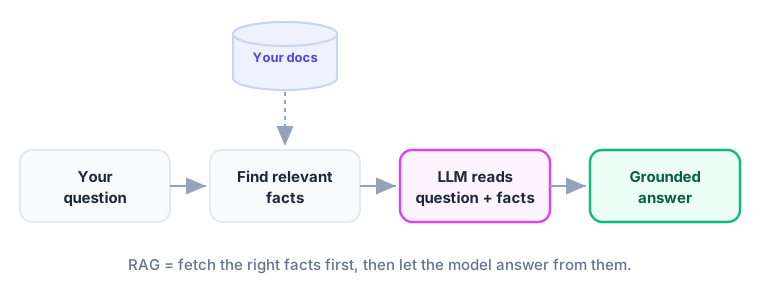
The flow: take the user's question → search your documents for relevant passages → paste those passages into the prompt → let the model answer from them.
Key idea: RAG is like giving the model an open-book exam. Instead of answering from memory (and risking a hallucination), it answers using the specific, trusted facts you handed it. This is the most popular way to make AI reliable on private or up-to-date information.
4. Agents: Models That Take Actions
A regular chatbot only talks. An agent can act — it can use tools like search, a calculator, or your calendar, and decide which to use to reach a goal.
The pattern is a loop: the model thinks about the goal, chooses a tool, sees the result, and repeats until the task is done. For example, an agent asked "What's the weather for my trip?" might look up your calendar, find the city, call a weather tool, and summarize.
Explain like I'm new: A chatbot is like asking a knowledgeable friend a question over the phone — they can only tell you what they know. An agent is more like a capable assistant who can also get up, check the calendar, make a call, and come back with a finished answer. Same friendly conversation, but now they can act on your behalf.
Common mistake: Reaching for a complex "agent" when a simple prompt or a basic chatbot would do. Agents add power but also unpredictability and cost. Start simple; add tools and autonomy only when the task truly needs them.
5. The Simple Architecture Behind It All
Most beginner AI apps follow the same shape:
| Layer | Job |
|---|---|
| User interface | Where the person types and reads |
| Your app | Builds the prompt, adds rules and (for RAG) retrieved facts |
| The model (via API) | Generates the response |
| Optional: knowledge base / tools | Supplies facts (RAG) or actions (agents) |
Understand this diagram and you can read the design of almost any AI product.
Key Takeaway: You build with Gen AI by calling an existing model through an API and shaping what surrounds it. A chatbot = system prompt + history + message. RAG feeds the model your trusted facts first (an open-book exam) to cut hallucinations. Agents let the model use tools to take actions. The architecture is simple: interface → your app (+ retrieval/tools) → model → response.