"The same core idea — learn patterns, then generate — now works across words, pictures, sound, and moving images."
Learning Objectives
By the end of this module, you will be able to:
- Name the four main types of content Gen AI can create
- Match each type to real use cases
- Understand each one's strengths and limits
- Use generated media responsibly
1. One Idea, Many Media
Generative AI isn't just about text. The same principle — study huge amounts of examples, then create something new — powers four families of tools:
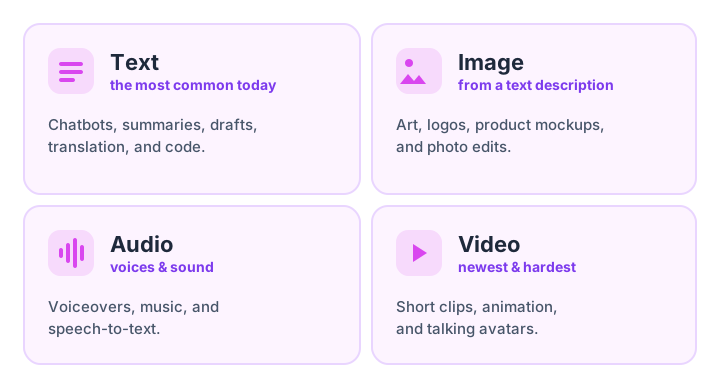
Key idea: Whatever the medium, the recipe is the same: the model learned patterns from lots of examples, and now it generates new content that fits your prompt. Text is the most mature; video is the newest and hardest.
Why is text so far ahead of video? It comes down to practice material and complexity. There's an enormous amount of written text online to learn from, and a sentence is simple to produce. A single second of video is dozens of images that must stay consistent — the same face, the same lighting, objects that don't pop in and out. Think of it as difficulty levels in a game: text is the tutorial level, images a few levels up, and video the boss level — which is why it's improving fast but still stumbles with the odd extra finger or flickering background.
2. Strengths and Limits at a Glance
Each modality is brilliant at some things and shaky at others. Knowing this saves you frustration:
| Modality | Great for | Watch out for |
|---|---|---|
| Text | Drafts, summaries, ideas, translation | Confident-sounding errors (hallucinations) |
| Image | Concepts, art, mockups, edits | Hands, text-in-images, exact accuracy |
| Audio | Voiceovers, music, transcription | Voice cloning misuse, unnatural moments |
| Video | Short clips, animation, avatars | Cost, length limits, visual glitches |
Audio tools read text aloud, generate background music, or transcribe a recorded meeting. Video tools turn a sentence into a few seconds of footage, but they're the youngest of the four: clips stay short and still slip up on fine details.
Try this: Pick the modality that matches your task, not the flashiest one. Drafting a newsletter? Text. Need a quick illustration? Image. For most everyday jobs a good paragraph or a single image does the work faster than video.
3. How Image Generation Works (Simply)
Most image generators use a clever method called diffusion. Picture it in reverse:
- Start with a screen of pure random static (like TV noise).
- Step by step, the model removes noise, nudging the pixels toward something that matches your prompt.
- After many steps, a clear image emerges from the fog.
It learned to do this by watching millions of images get noisier, then practicing the reverse. That's why the same prompt can produce different images each time — it starts from different noise.
A homely analogy: imagine a sculptor handed a rough block who chips away until the shape they had in mind appears. A diffusion model does the same with pixels — starting from meaningless static and, guided by your words, carving away the randomness until a matching picture is left standing. Because it begins from a different patch of static each time, you're never guaranteed the exact same result twice — which is what makes these tools feel creative rather than like a photocopier.
Try this: In any image tool, generate the same prompt twice — for example, "a cozy reading nook by a rainy window, watercolor style." Compare the two results. Seeing how much they differ makes the "start from random noise" idea click.
4. Using Generated Media Responsibly
Because this content can look and sound real, responsibility matters:
- Be honest. Disclose AI-generated media when it could mislead people.
- Respect people. Don't clone someone's voice or likeness without consent.
- Check rights. Understand the tool's rules for commercial use (see Module 6).
- Beware deepfakes. Realistic fakes can spread misinformation — think before you share.
Real-world use case: A small charity needs a warm narrator for a fundraising video but can't afford a voice actor. Using a synthetic voice offered by the tool is perfectly reasonable — cloning a real person's voice without permission is not. The line is simple: create freely, but never impersonate real people or pass fakes off as genuine.
Common mistake: Assuming a photo, voice, or video is real just because it looks polished. Generated media is now good enough to fool a quick glance. When something feels off — or the stakes are high — verify the source.
Key Takeaway: Generative AI creates text, images, audio, and video from the same core idea of learning patterns and generating new content. Text is the most reliable; images use "diffusion" (turning noise into a picture); video is newest and most limited. Each modality has clear strengths and weak spots — and all of them demand honest, respectful use.