
"When data is neat and connected, a relational database keeps it organized — and SQL is the simple language for asking it questions."
Learning Objectives
By the end of this module, you will be able to:
- Explain what a relational database is
- Understand tables, rows, columns, and keys
- Read a basic SQL query
- Know when relational databases fit
1. Data in Tables
A relational database stores data in tables — like connected spreadsheets. Each table has rows (records) and columns (fields).
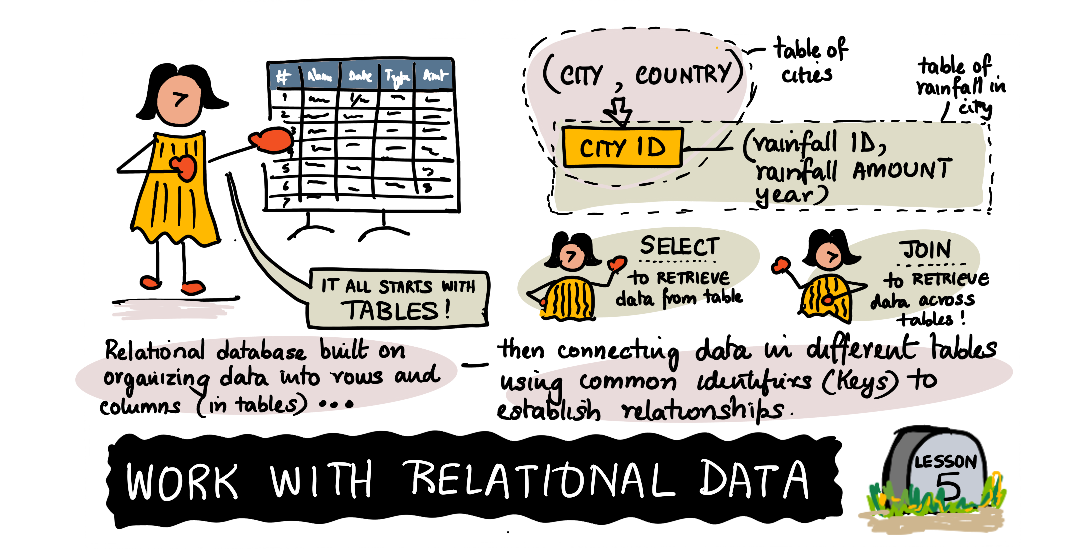
Key idea: The "relational" part means tables can be linked. A customers table and an orders table connect through a shared key (like customer_id), so you never repeat the same info twice.
Explain like I'm new: Picture a customers table where each row is one person and each column is one detail — name, city, email. Every row shares the same columns, so the data is perfectly tidy. A relational database is really just many of these tidy tables that know how to reference each other.
The word "relational" trips people up — it sounds like it's about the relationships between people, but it actually means the relationships between tables. Splitting data across several linked tables (customers here, orders there, products elsewhere) instead of one giant sheet is what makes the whole system fast, tidy, and reliable even when it holds millions of rows.
2. Keys & Relationships
- Primary key — a unique ID for each row (e.g.,
customer_id) - Foreign key — a column that points to another table's primary key
This linking keeps data consistent: change a customer's name once, and every order still points to the right record. The alternative — copying the customer's name into every single order row — is a recipe for chaos: fix a typo in one place and a hundred other rows still show the old spelling. Keys let each fact live in exactly one place, which is the whole reason relational databases stay trustworthy as they grow.
Concept: Storing each fact once and linking to it is called normalization. You don't need the jargon yet — just the instinct: never store the same piece of information in two places if a key can connect them instead.
3. Asking Questions with SQL
SQL (Structured Query Language) is how you talk to a relational database. It reads almost like English:
[object Object], name, city
,[object Object], customers
,[object Object], city ,[object Object], ,[object Object],;
That says: "Give me the name and city columns, from customers, where the city is Paris."
The three words do three jobs: SELECT chooses which columns you want, FROM names which table, and WHERE filters to only the rows you care about. Master those three and you can already answer a surprising number of real questions.
Simple example: To find your top 5 best-selling products, you'd SELECT the product and total sales, ORDER BY sales, and LIMIT 5. One short query answers a real business question.
The real power arrives when you combine tables. A JOIN stitches rows from two tables together using their shared key — matching each order to its customer, for instance — so you can ask questions that span both. That single idea, joining on keys, is what lets a relational database answer rich questions ("which customers bought what, and where they live") without ever duplicating a name or address.
4. When to Use One
Relational databases shine when data is structured and connected — customers, orders, payments, inventory. They enforce consistency and handle huge, related datasets reliably.
They're the natural home for anything where accuracy is non-negotiable: a bank cannot afford an order that points to a customer who doesn't exist, or a payment counted twice. The strict structure that feels rigid is exactly what guarantees the numbers add up. The database can even refuse bad data — reject an order with no matching customer, or block a duplicate ID — so mistakes are caught at the door rather than discovered later in a broken report.
Real-world use case: An online shop's database links customers, orders, and products. One join-style query can answer "which customers in Paris bought running shoes last month?" — pulling from three tables at once, with no duplicated data and no guesswork.
Data scientist tip: SQL is one of the highest-value skills in data science — nearly every company stores its data in relational databases. Even basic SELECT … WHERE … ORDER BY will take you a long way.
Try this: Take a spreadsheet you already have and imagine splitting it into two linked tables (say, "people" and "purchases") joined by an ID column. Sketching that split trains the exact mental model behind every relational database.
Key Takeaway: A relational database stores data in linked tables of rows and columns, connected by primary and foreign keys to avoid duplication and stay consistent. SQL is the readable language for querying it (SELECT … FROM … WHERE …). It's the go-to for structured, connected data — and a core data-science skill.
Further Learning
Adapted from Microsoft's Data Science for Beginners (MIT License). Sketchnote by Nitya Narasimhan.