"A model answers questions. An agent takes actions. azd can provision and deploy an AI agent to Azure as easily as any other app."
Level: Beginner · Time: ~2 days · Prerequisites: Module 12
Learning Objectives
By the end of this module, you will be able to:
- Explain what an AI agent is
- Understand how agents run on Azure / Foundry
- Deploy an agent app with azd
- Recognize the pieces an agent needs
1. From Model to Agent
A plain model generates text. An AI agent wraps a model with the ability to act — call tools, look up data, and take multiple steps toward a goal. "What's the weather and should I bring a jacket?" becomes: call a weather tool, read today's forecast, reason about the temperature, and only then answer. The model supplies the judgment; the tools supply the facts and the actions. Take the tools away and you are back to a chatbot that can only talk about jackets, never check the sky.
Concept: An agent = a model + tools + a loop. It decides what it needs, uses a tool to get it, observes the result, and repeats until it can answer. Azure gives it a secure home to run in.
2. Agents on Azure Foundry
Microsoft Foundry provides an agent service: you define an agent (its model, instructions, and tools), and Azure hosts it. You can see and manage your agents, their tools, and their data connections in the Foundry portal.
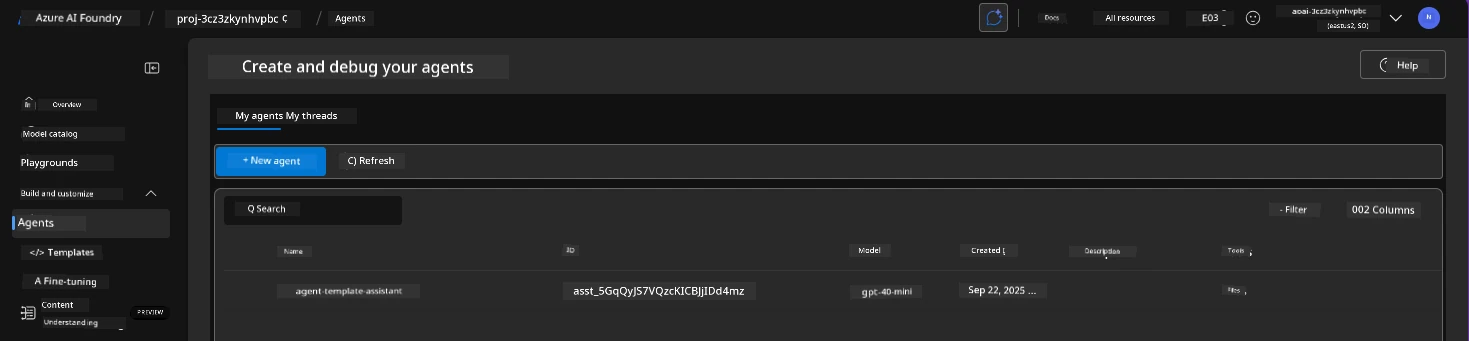
Explain like I'm new: Foundry is mission control for agents. You configure the agent's brain (model), its skills (tools), and what it can read (data), and Foundry runs and monitors it for you.
3. Deploying an Agent with azd
An agent app is still an app — so azd deploys it the usual way. A template provisions the Foundry project and model (Module 12), plus the app that hosts your agent logic, then deploys your code:
azd upThe result is a running agent, reachable through your app, backed by Azure infrastructure.
Try this: After deploying an agent template, ask it something that requires a tool (like a calculation or a lookup). Watching it act rather than just chat is the moment agents click.
4. What an Agent Needs
To run well on Azure, an agent typically needs:
| Piece | Why |
|---|---|
| A model | The reasoning engine (Module 12) |
| Tools | Functions/APIs it can call to act |
| Data / knowledge | Documents to ground answers (RAG) |
| Identity & secrets | Secure access to it all (Module 11) |
azd provisions and connects these from your template.
Common mistake: Giving an agent broad, unrestricted tool access. An agent that can act should follow least privilege too — only the tools and data it truly needs, so a mistake or misuse can't do much harm.
5. Why azd Helps Here
Agents touch many moving parts — model, tools, data, identity, hosting. Wiring those by hand is fiddly and easy to get wrong: a missing role assignment and the agent can't reach its data; a wrong endpoint and the tool calls fail silently. azd captures the whole setup as one template, so a complex agent system stands up reliably with a single command — and tears down just as cleanly with azd down when you're done experimenting.
Real-world use case: A support team deploys an agent that reads their help docs (RAG), can look up an order via a tool, and answers customers — provisioned and deployed by azd up from a template, identity and all.
✅ Checkpoint
- What can an AI agent do that a plain model can't?
- What does Microsoft Foundry provide for agents?
- Name three things an agent needs to run well on Azure.
Answers: 1) Take actions — call tools, look up data, and work through multiple steps toward a goal. 2) An agent service to define, host, manage, and monitor agents. 3) Any three: a model, tools, data/knowledge, and secure identity/secrets.
Key Takeaway: An AI agent is a model plus tools and a reasoning loop, so it can act, not just answer. Microsoft Foundry hosts and manages agents on Azure, and azd deploys an agent app like any other — provisioning the model, app, tools, and secure identity from one template with azd up. Apply least privilege to an agent's tools, since it can take real actions.
Further Learning
Part of "AZD for Beginners." Adapted from Microsoft's open AZD curriculum (MIT License).