"MCP has just three roles to learn. Get these clear and the whole protocol makes sense."
Level: Intermediate · Time: ~12 min · Prerequisites: Module 23
Learning Objectives
By the end of this module, you will be able to:
- Define host, client, and server in MCP
- Understand how they communicate
- Trace a request through the system
- Distinguish MCP's transport options
1. The Three Roles
| Role | What it is | Example |
|---|---|---|
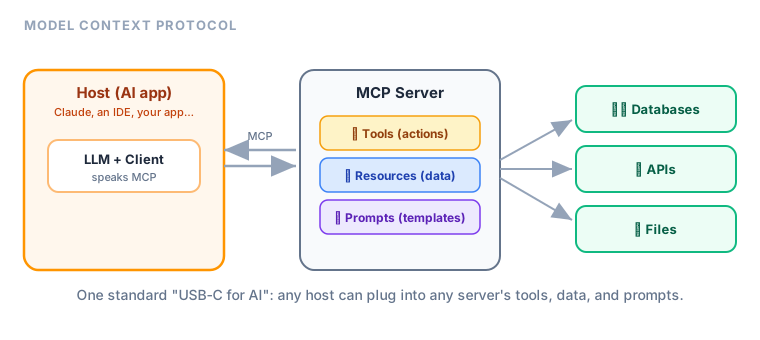
| Host | The AI app the user interacts with | Claude, an IDE, your chatbot |
| Client | Lives inside the host; speaks MCP to one server | The connector logic |
| Server | Exposes tools, data, and prompts | A GitHub server, a database server |
The host contains one or more clients, each connected to one server.
Explain like I'm new: Think of a phone (host) with several apps (clients), each calling a different company's hotline (servers). The phone is what you hold; each app knows how to talk to one service; each service offers specific things.
2. How They Talk
The client and server exchange structured messages (using JSON-RPC under the hood). JSON-RPC is a simple, well-established format for "call this function with these arguments, get a result back" — so MCP didn't invent a new wire language, it reused a proven one. The flow:
- The host's client connects to a server and asks "what can you do?"
- The server advertises its tools, resources, and prompts.
- When needed, the client requests a tool call or resource.
- The server responds with the result.
Key idea: MCP is a capability-discovery protocol. A client doesn't need to know a server's features in advance — it asks, and the server describes them. That's how a host instantly gains new powers just by connecting to a new server.
Explain like I'm new: Discovery is like plugging in a new appliance that announces itself: "Hi, I'm a coffee maker; I can brew, steam, and descale." The host didn't need to be programmed for coffee makers in advance — it just asked, and the server listed what it offers.
3. Transports: Local vs. Remote
MCP servers can run:
- Locally (on your machine) — communicating over standard input/output (stdio). Great for file access, local tools.
- Remotely (over the network) — communicating over HTTP. Great for shared, cloud-hosted services.
Same protocol either way; only the "pipe" differs. The distinction matters for privacy and deployment: a local stdio server runs as a process on your own machine, so sensitive data (your files, local databases) never leaves it. A remote HTTP server can be shared by a whole team but needs the security controls you'd give any web service — authentication, encryption, access limits. Because the messages are identical, a server can often be moved from local to remote with little code change.
Real-world use case: A developer runs a local MCP server for file access (fast, private) and connects to a remote MCP server for their company's shared knowledge base. The host coordinates both through the same protocol — one conversation, two servers.
4. Why the Separation Helps
Splitting host, client, and server keeps concerns clean: hosts focus on UX and the LLM, servers focus on exposing capabilities safely, and clients handle the protocol. You can build a server without knowing which hosts will use it — and vice versa.
Common mistake: Thinking one host talks to one server. A host can run many clients to many servers at once, mixing local and remote capabilities. That composability is a core strength.
Hands-On: Try This
Try this: Label your favorite AI assistant setup: what's the host? If it can read your files and search the web, those are two servers, each via a client. Drawing this "host → clients → servers" map for a real tool makes the roles concrete.
✅ Checkpoint
- Name the three MCP roles.
- What does "capability discovery" mean?
- What are the two transport options?
Answers: 1) Host, client, server. 2) A client asks a server what it can do, rather than knowing in advance. 3) Local (stdio) and remote (HTTP).
Key Takeaway: MCP has three roles: the host (the AI app), the client (inside the host, speaks MCP to one server), and the server (exposes tools, resources, prompts). They exchange structured messages, with the client discovering a server's capabilities on connect. Servers run locally (stdio) or remotely (HTTP), and a host can connect to many servers at once.
Further Learning
Adapted from Microsoft's MCP for Beginners (MIT License).