"Teaching a computer to 'see' means turning pixels into understanding — and one clever network design made it possible."
Level: Beginner–Intermediate · Time: ~13 min · Prerequisites: Modules 4–5
Learning Objectives
By the end of this module, you will be able to:
- Explain how a computer represents an image
- Understand what a Convolutional Neural Network (CNN) does
- Recognize common vision tasks
- See where computer vision is used
1. An Image Is Just Numbers
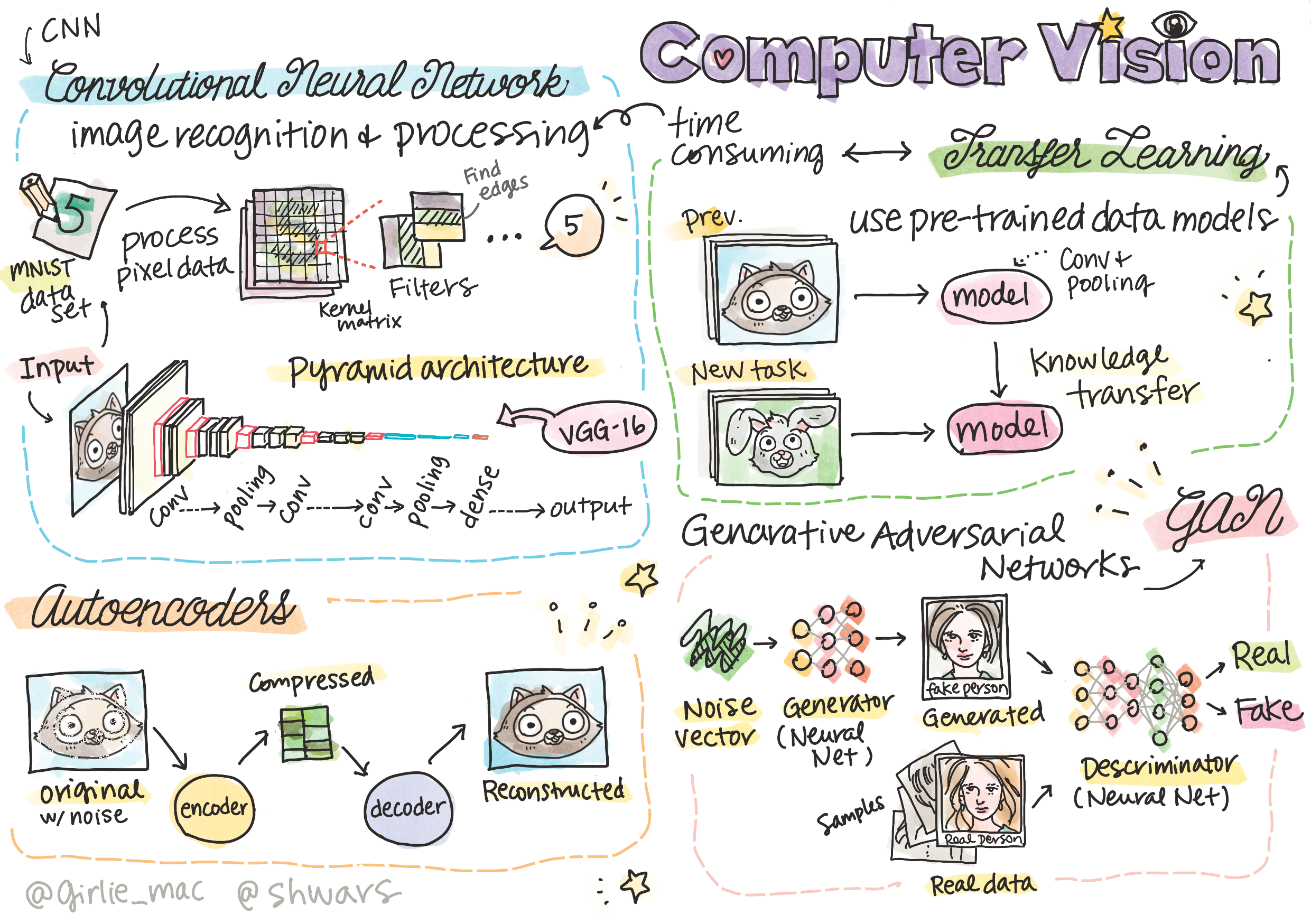
To a computer, a photo is a grid of numbers — each pixel's brightness and color as values. A 1000×1000 color image is three million numbers (one million pixels × three color channels: red, green, blue). Computer vision finds patterns in those numbers. When you brighten a photo in an app, you're literally adding to every one of those numbers; when a model "sees" a dog, it's spotting a familiar arrangement of them.
Explain like I'm new: Imagine a giant spreadsheet where each cell is one pixel's color. The computer never "sees" a cat — it sees numbers, and learns which arrangements of numbers tend to mean "cat."
2. Why Regular Networks Struggle — and CNNs Shine
A plain neural network treating each pixel as a separate input would need billions of weights and ignore that nearby pixels belong together. The breakthrough is the Convolutional Neural Network (CNN).
A CNN slides small filters across the image, each detecting a little pattern — an edge, a corner, a texture. Stack these layers and the network builds up from edges → shapes → objects.
Explain like I'm new: A filter is like a tiny stencil you slide over every part of a photo asking one question — "is there a vertical edge right here?" One stencil checks the whole image, so the network learns "edge detector" once and reuses it everywhere, instead of relearning it for each corner of the picture.
Key idea: CNNs exploit a simple truth about images: nearby pixels are related, and a useful pattern (like an edge) looks the same wherever it appears. Sliding filters reuse the same weights across the whole image — vastly efficient and effective.
3. Common Vision Tasks
| Task | What it does | Example |
|---|---|---|
| Classification | Label the whole image | "This is a dog" |
| Detection | Find and box objects | Locate cars in a street photo |
| Segmentation | Label every pixel | Outline a tumor in a scan |
| Generation | Create images | Text-to-image tools |
Real-world use case: Self-driving cars run CNNs continuously — detecting lanes, pedestrians, and signs from camera feeds many times per second. The same technology reads medical scans, sorts recycling, and powers photo search.
4. Transfer Learning: Standing on Giants' Shoulders
Training a top vision model from scratch needs millions of images and huge compute. Instead, practitioners use transfer learning: take a network already trained on a giant dataset, and fine-tune it on your smaller one. It's like hiring an expert who already knows vision and just needs to learn your specific task. In practice, a startup wanting to spot defective parts on a production line might start from a model trained on millions of everyday photos, then fine-tune it on just a few hundred pictures of good and faulty parts — reaching strong accuracy in an afternoon instead of a month.
Hands-On: Try This
Try this: Look at a blurry or partial photo and notice how you still recognize the object from edges and shapes. That layered build-up — edges to shapes to objects — is exactly what a CNN learns. Try describing which features told you what it was.
Common Mistakes
Common mistake: Trusting vision models blindly. They can be fooled by odd angles, lighting, or rare cases, and they don't truly "understand" a scene. In high-stakes uses (medicine, driving), always keep human review.
✅ Checkpoint
- How does a computer represent an image?
- What does a CNN's filter do?
- What is transfer learning?
Answers: 1) As a grid of pixel numbers. 2) Slides across the image detecting a small pattern (edge, texture). 3) Reusing a pre-trained model and fine-tuning it on your own task.
Key Takeaway: To a computer, images are grids of numbers. CNNs slide small filters to detect patterns — edges, then shapes, then objects — efficiently reusing weights across the image. They power classification, detection, segmentation, and generation, and transfer learning lets you reuse powerful pre-trained models instead of starting from scratch.
Further Learning
Adapted from Microsoft's AI for Beginners (MIT License). Sketchnote by Tomomi Imura.