"You've gone from 'how does the web work?' to building interactive, data-driven pages. Here's the whole map — and where the road leads next."
Learning Objectives
By the end of this module, you will be able to:
- See the full course roadmap at a glance
- Understand the learning stages
- Know what to build first
- Choose where to go next
1. Your Learning Path
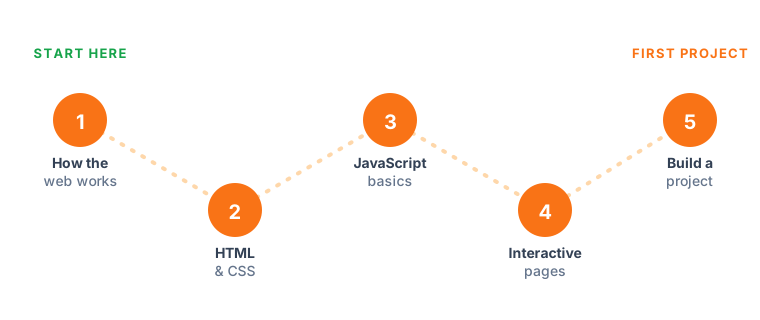
This single picture captures the whole journey. Notice how each stage rests on the one before it: you can't style a page you haven't structured, and you can't add behaviour to elements that don't exist yet. Learning in this order means every new idea has something solid to attach to, instead of floating free and feeling arbitrary.
2. The Full Module Roadmap
| # | Module | Stage |
|---|---|---|
| 1 | Course Overview & Learning Path | Start |
| 2 | How the Web Works | Foundations |
| 3 | Tools of the Trade | Foundations |
| 4 | Version Control with Git & GitHub | Foundations |
| 5 | HTML Basics | HTML & CSS |
| 6 | CSS Basics | HTML & CSS |
| 7 | Responsive Design & Layout | HTML & CSS |
| 8 | JavaScript — Variables & Data Types | JavaScript |
| 9 | JavaScript — Functions & Methods | JavaScript |
| 10 | JavaScript — Making Decisions | JavaScript |
| 11 | JavaScript — Arrays & Loops | JavaScript |
| 12 | The DOM & Closures | Interactivity |
| 13 | Events & Forms | Interactivity |
| 14 | How Browsers Work & Extensions | Browsers & Data |
| 15 | APIs and Data | Browsers & Data |
| 16 | Background Tasks & Performance | Browsers & Data |
| 17 | Canvas & Game Loops | Advanced |
| 18 | Client-Side Routing | Advanced |
| 19 | State Management | Advanced |
| 20 | Browser Tools & Debugging | Polish |
| 21 | Accessibility & Best Practices | Polish |
| 22 | Projects & Exercises | Practice |
| 23 | Knowledge Check | Review |
| 24 | Glossary | Reference |
| 25 | Roadmap & Next Steps | Next |
3. The Learning Stages
- Foundations — how the web works and your tools (Modules 2–4)
- HTML & CSS — structure, style, responsiveness (5–7)
- JavaScript — the language, one concept at a time (8–11)
- Interactivity — the DOM, closures, events, forms (12–13)
- Browsers & Data — how browsers work, APIs, performance (14–16)
- Advanced concepts — canvas, routing, state (17–19)
- Polish & practice — debugging, accessibility, projects (20–22)
Think of the stages as floors of a building rather than a checklist to race through. Each one is worth genuinely living on for a while — building small things, making mistakes — before you climb to the next. Rushing upward on shaky floors is the single most common way beginners stall and lose confidence.
Key idea: Don't rush to frameworks. The developers who thrive have solid HTML, CSS, and JavaScript fundamentals — everything else (React, Vue, and beyond) is built on exactly what you learned here.
4. What to Build First & Where to Go Next
Start with the terrarium (Module 22) — HTML, CSS, and the DOM, no data or frameworks. Then try the typing game, and eventually the banking app (which uses routing and state). Resist the urge to jump straight to the flashiest project; each one assumes the skills of the ones before it, so climbing in order means you're never fighting five brand-new concepts at once.
When you're ready for more:
- Go deeper: CSS animations, more JavaScript patterns, testing
- Frameworks: React, Vue, or Svelte (all build on JS fundamentals)
- On this platform: explore Gen AI for Beginners and AI Agents for Beginners to add AI to your web skills
Beginner tip: Build in public. Put your projects on GitHub (Module 4) and share them. A small, finished, shared project beats a big unfinished one every time — and it becomes your portfolio.
Try this: Pick a date two weeks out on your calendar and commit to having the terrarium finished by then. A deadline, even a self-imposed one, quietly turns "someday" into a project you actually ship.
Key Takeaway: The course spans 25 modules across Foundations → HTML/CSS → JavaScript → Interactivity → Browsers & Data → Advanced → Polish & Practice. Master fundamentals before frameworks, start practicing with the terrarium, share your work on GitHub, and continue into a JS framework or this platform's AI tracks.