"RAG gives an LLM an open-book exam — fetch the right facts first, then let it answer from them. It's the #1 way to make AI reliable."
Level: Intermediate · Time: ~14 min · Prerequisites: Module 20
Learning Objectives
By the end of this module, you will be able to:
- Explain what a vector store is
- Describe the full RAG flow
- Understand why RAG reduces hallucinations
- Know when RAG is the right tool
1. Vector Stores: The Searchable Memory
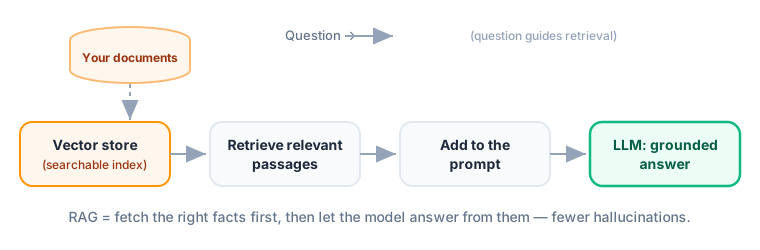
A vector store (vector database) holds your document embeddings and finds the closest ones to a query — fast, even across millions of chunks. Popular options: Chroma, FAISS, Pinecone, pgvector. The clever part is speed: naively comparing a query against millions of vectors one by one would be slow, so vector stores use approximate nearest-neighbor indexes that find the closest matches in milliseconds by trading a sliver of accuracy for a huge speedup.
Explain like I'm new: A vector store is a librarian who has read all your documents and, given any question, instantly hands you the few most relevant pages. The LLM then answers using those pages instead of its fuzzy memory.
Concept: Each chunk is usually stored with metadata — its source file, page number, date — alongside the vector. That lets you filter ("only search 2024 contracts") and, crucially, show citations so users can verify where an answer came from.
2. Retrieval-Augmented Generation (RAG)
RAG combines retrieval + generation:
- Index (once): chunk and embed your documents into a vector store.
- Retrieve: embed the user's question, fetch the closest chunks.
- Augment: add those chunks to the prompt as context.
- Generate: the LLM answers from the provided facts.
Key idea: RAG's magic is grounding. Instead of answering from memory (and risking hallucination), the model answers from real, retrieved text — so it can cite sources and stay current. It's the most popular technique for trustworthy LLM apps.
3. RAG in LangChain
LangChain provides every piece — splitters, embeddings, vector stores, retrievers — and wires them into a chain:
[object Object],
retriever = vector_store.as_retriever()
chain = {,[object Object],: retriever, ,[object Object],: passthrough} | prompt | model
chain.invoke(,[object Object],)
The retriever fetches relevant policy chunks; the prompt injects them; the model answers grounded in them.
Real-world use case: Nearly every "chat with your docs / PDF / website" product is RAG. Legal teams query contracts, support teams query help docs, students query their notes — all with the same pattern: retrieve, then generate.
4. When to Use RAG (and Its Limits)
Use RAG when answers live in a specific body of text — your docs, recent data, private knowledge. It's not needed for general knowledge the model already has, and it won't fix a task that truly needs a tool/action. RAG also has a natural edge over fine-tuning for changing information: to update what the model "knows," you just add or replace documents in the store — no retraining. And because the answer is grounded in retrieved passages, you can display those passages as evidence, which builds user trust in a way a bare answer never can.
Common mistake: Blaming the LLM when RAG answers are wrong — the culprit is usually retrieval. If the right chunk wasn't fetched, the model can't use it. Improve chunking, embeddings, and retrieval before blaming the model.
Hands-On: Try This
Try this: Pick a set of documents you know well (class notes, a manual). Write one question whose answer is buried in them. Trace the RAG steps: which chunk should be retrieved? That chunk-in-the-prompt is what makes the answer trustworthy.
✅ Checkpoint
- What does a vector store do?
- List the four RAG steps.
- Why does RAG reduce hallucinations?
Answers: 1) Stores embeddings and finds the closest to a query. 2) Index → retrieve → augment → generate. 3) The model answers from real retrieved facts, not fuzzy memory.
Key Takeaway: A vector store holds document embeddings and finds the closest to a query. RAG = index → retrieve → augment → generate, so the LLM answers from real, retrieved text (grounding) — the top way to cut hallucinations and stay current. LangChain wires the pieces together. When RAG fails, suspect retrieval first.
Further Learning
Adapted from the LangChain for Beginners curriculum (MIT License).