"You now understand how agents think and act. Here's how to go from understanding them to building your own — one confident step at a time."
Learning Objectives
By the end of this module, you will be able to:
- Follow a beginner → intermediate path
- Choose practice activities that build real skill
- Pick a framework to explore
- Know exactly what to build first
1. The Path from Beginner to Intermediate
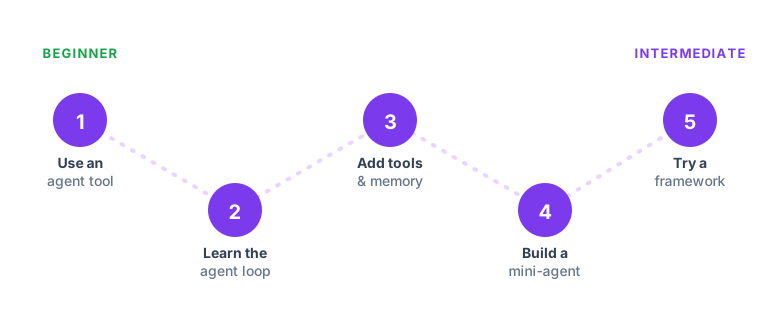
You level up by building slightly harder things over time — not by reading more. Here's the journey:
2. Stage by Stage
| Step | What to do | Ready to move on when… |
|---|---|---|
| 1. Use an agent tool | Try an existing agent (a research or coding assistant) | Agents feel useful, not mysterious |
| 2. Learn the loop | Trace think → act → observe on a real task | You can explain the loop to a friend |
| 3. Add tools & memory | Give an assistant one tool; remember a preference | You see how tools change what's possible |
| 4. Build a mini-agent | Ship one project from Module 10 (start with FAQ/RAG) | You've built something that truly helps |
| 5. Try a framework | Rebuild it in CrewAI or LangGraph | You can wire up a tool and a loop yourself |
Key idea: Raise the difficulty just a little at each step. Comfort, then stretch, then repeat. That steady climb turns a beginner into someone who ships real agents.
Explain like I'm new: This is the same way you'd learn to cook — you don't start with a five-course dinner. You reheat leftovers, then follow a simple recipe, then improvise your own. Each step feels only slightly harder than the last, which is exactly why you never get overwhelmed and quit.
3. Practice Activities
- Trace an agent. For any AI tool you use, narrate its loop: goal → think → act → observe.
- Design before you build. Write the goal, the tools, and the stopping condition on one card.
- Start read-only. Build agents that propose actions first; add real actions once you trust them.
- Break it on purpose. Try a tricky input to see where your agent fails — then fix that.
Try this: Take an agent you already use this week and narrate its loop out loud, step by step, as if teaching a friend. If you can explain why it did each thing, you understand it. If you stumble somewhere, that gap is your next thing to learn — a free, personalized study plan.
4. Frameworks to Explore
You don't need these to start, but they make building agents much easier:
| Framework | Best for | Vibe |
|---|---|---|
| CrewAI | Beginners | Think of agents as a team ("crew") with roles |
| LangGraph | Production & control | Model the agent as a graph of steps |
| AutoGen | Multi-agent conversations | Agents (and humans) talking to solve tasks |
A gentle warning: don't shop for the "perfect" framework before you've built anything. All three do the same core job — running a loop and calling tools — and you learn far more from finishing one small project than from comparing feature lists. Pick CrewAI, build the thing, and switch later only if you hit a real limit.
Common mistake: Getting stuck in "tutorial mode" — endlessly watching and reading without ever building. It feels productive, but understanding an agent and making one are different skills, and only the second one sticks. The moment a concept makes sense, stop reading and go build the smallest possible version of it. A half-working agent you made teaches you more than ten polished tutorials you watched.
5. What to Build First
Beginner tip: Build the FAQ / RAG assistant from Module 10 first. It's the safest and most rewarding starting point — no risky actions, a clear "wow" when it answers from your own notes, and it teaches RAG, tools, and the loop all at once. Then add a second tool and you've got a real agent.
Key Takeaway: Grow by doing slightly harder things: use an agent, learn the loop, add tools and memory, build a mini-agent, then try a framework like CrewAI or LangGraph. Practice by tracing loops and designing before building, start read-only for safety, and build the FAQ/RAG assistant first.