"Every AI-agent app, big or small, follows the same simple shape. Learn it once and you can read the design of almost any agent."
Learning Objectives
By the end of this module, you will be able to:
- Read a simple AI-agent architecture diagram
- Explain what each layer does
- See how the pieces from earlier modules fit together
1. The Shape of an Agent App
Here's the blueprint nearly every beginner agent app follows:
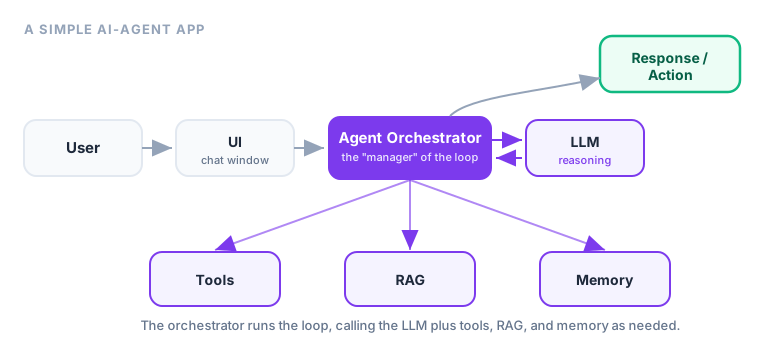
The flow: User → UI → Agent Orchestrator → LLM → (Tools / RAG / Memory) → Response / Action.
Key idea: The orchestrator is the star. It's the "manager" that runs the loop — calling the LLM to think, reaching for tools, RAG, and memory when needed, and deciding when the task is done. Everything else plugs into it.
Explain like I'm new: Think of the orchestrator as a movie director. The LLM is the lead actor (does the thinking), tools are the crew (do the work), RAG and memory are the script and notes. The director doesn't act or hold a camera — but nothing happens in the right order without them calling the shots. That's the orchestrator's job.
2. The Layers, Explained
| Layer | Its job | From module |
|---|---|---|
| User | Has a goal to accomplish | — |
| UI | Where the person types and sees results (a chat window) | — |
| Agent Orchestrator | Runs the loop; coordinates everything | 2 |
| LLM | The reasoning brain that decides next steps | 2, 3 |
| Tools | Actions the agent can take | 5 |
| RAG | Looks up your documents for facts | 7 |
| Memory | Remembers context and preferences | 6 |
| Response / Action | The final answer or completed task | 2 |
Notice this ties the whole track together: the orchestrator runs the loop (Module 2), using the components (Module 3) — tools, RAG, and memory — safely (Module 9).
One thing worth spotting: the arrows aren't a one-way street. The orchestrator loops back to the LLM again and again — think, act, observe, think — until the goal is met. The diagram looks linear, but the real action is that repeating cycle in the middle, exactly the loop you met in Module 2.
You might also wonder where safety lives in this picture. It isn't a single box — it wraps around the whole diagram. Guardrails sit at the edges where the agent touches the outside world: on the tools (limiting what each one can do), on the inputs (checking what comes back from a search or a document), and often as a human-approval gate right before a risky action runs. So while the orchestrator coordinates the flow, guardrails quietly police it at every point where a mistake could reach reality. Keep that in mind as you read any architecture diagram: the boxes show what the agent can do, and the guardrails decide what it's allowed to do.
3. Start Simple
You don't need every box on day one. A minimal agent is just UI → orchestrator → LLM → one tool. Add RAG when the agent needs your documents; add memory when it needs to remember; add more tools as tasks grow. Each new box should earn its place by solving a problem you can actually feel — never add memory or RAG just because the diagram has room for them.
Real-world use case: A weekend project chatbot that answers questions about your notes needs only four boxes: a chat UI, an orchestrator, an LLM, and one search tool over your documents (that's RAG). No long-term memory, no dozen tools — just enough to be useful. You can literally point at each box and name it. Growth is adding boxes, not redesigning.
Beginner tip: When you look at any agent product, try to label its boxes: What's the UI? Who's the orchestrator? What tools does it have? Does it use RAG or memory? This one habit makes complex systems suddenly readable.
Key Takeaway: Almost every agent app is User → UI → Orchestrator → LLM → Tools/RAG/Memory → Response/Action. The orchestrator runs the loop and coordinates the pieces you learned earlier. Start minimal (UI → orchestrator → LLM → one tool) and add RAG, memory, and tools as the task demands.