"Without tools, an agent can only talk. With tools, it can search, calculate, book, send, and build. Tools are what turn thinking into doing."
Learning Objectives
By the end of this module, you will be able to:
- Explain what "tools" are for an agent
- Say why tools are essential
- Recognize common tools and their uses
- Follow safe tool-use rules
1. What Are Tools?
A tool is any action an agent can take in the outside world — searching the web, doing math, reading a database, sending an email. The technical mechanism behind this is called function calling: the LLM outputs a request like "call search('best laptops 2026')", your app runs it, and hands the result back to the agent.
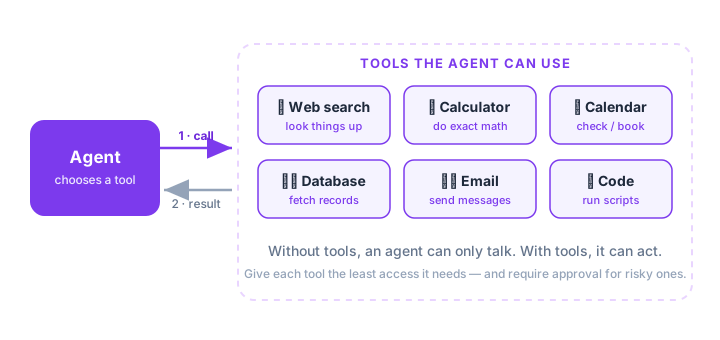
Each tool comes with a short description the model reads — its name, what it does, and what inputs it expects. The clearer that description, the better the agent picks the right tool at the right time. A tool called send_email(to, subject, body) with a one-line explanation is something the model can use confidently; a vague, undocumented one just confuses it.
Key idea: The LLM doesn't run tools itself — it asks for them. It says "please run this tool with these inputs," your app actually runs it, and the result goes back into the loop. The model decides which tool and when.
Explain like I'm new: Picture a chef who can describe any dish but has no hands. Function calling is the waiter. The chef (LLM) calls out "chop the onions"; the waiter (your app) does it and reports back "onions chopped." The chef never touches a knife — it just gives instructions and reacts to what comes back.
2. Why Agents Need Tools
An LLM on its own is frozen in the past (its training data) and can't touch the real world. Tools break both limits: they give the agent fresh information (search, databases) and the ability to act (send, book, run). A calculator tool even fixes the classic weakness that LLMs are shaky at exact math.
Common tools include:
- Web search — look up current information
- Calculator — exact arithmetic
- Database — fetch or update records
- Email / calendar — send messages, book events
- Code runner — execute scripts and return output
There's a subtle but important detail in how the result comes back. When your app runs the tool, it doesn't just hand the answer to the user — it feeds the answer back into the model as the next thing the agent reads. So the agent asks for a search, sees the search results, and then reasons about them on its very next turn. This is what lets tools chain together: the output of one becomes the input to the agent's next decision. A calculator result, a database row, an error message — each flows back into the loop and shapes what the agent does next.
3. Safe Tool-Use Rules
Tools are powerful, which means they can also do damage. A few beginner rules keep agents safe:
- Least privilege — give each tool the minimum access it needs (read-only when possible).
- Validate inputs — never blindly trust what goes into a tool.
- Require approval — for risky actions (spending money, deleting data, sending to many people), pause for a human "yes."
- Sandbox — run code tools in an isolated space, not on your real system.
Real-world use case: Say your agent has a database tool. If you give it a read-only connection, the very worst a bug or a malicious instruction can do is read data it shouldn't — bad, but recoverable. Give it full write and delete access "just in case," and one wrong step could wipe your records. The narrower permission is the safety net.
Common mistake: Handing an agent broad, powerful access "to be safe." The opposite is true — the more a tool can do, the more damage a mistake (or a malicious instruction) can cause. Start read-only and expand access only when needed.
Beginner tip: When you design your first tool, write one sentence describing exactly what it does and the smallest permission it needs. If you can't describe it simply, the agent won't use it reliably either.
Key Takeaway: Tools are the actions an agent can take, wired up through function calling — the LLM requests a tool, your app runs it, and the result returns to the loop. Tools give agents fresh data and the power to act. Keep them safe with least privilege, input validation, human approval for risky steps, and sandboxing.